> ## Documentation Index
> Fetch the complete documentation index at: https://docs.cortex.foundation/llms.txt
> Use this file to discover all available pages before exploring further.
# Approvals and tool policy
> Allow, Deny and Always: how a bot parks a consequential step, which tools always ask, and the rules and tiers that decide before you are asked.
A bot can act on its own computer and in the apps you connected to it, so it asks before it does anything consequential. When it reaches such a step the turn **parks**: the tool does not run, the bot waits, and you get a widget naming the tool, the bot's reason for wanting it and the exact arguments it intends to use.
This page covers the three choices, which tools always ask and which never do, the automatic policy that decides before you are involved, where pending approvals show up, and what happens when something cannot be settled. **Cortex Bot** is the only Cortex product with per-tool approval, because a bot runs without a round limit and with a machine of its own.
 ## The three choices
One sentence from the product carries the whole model: `Allow runs the parked tool. Deny does not. Always writes a rule.`
| Choice | What happens |
| ---------- | ----------------------------------------------------------------------------------------------------- |
| **Allow** | The parked tool runs, this once, with the real arguments, and the turn continues from the real result |
| **Deny** | The tool does not run and nothing is written. The bot is told why and can propose something else |
| **Always** | Writes a rule so that tool does not ask again on this bot, then runs it |
**Allow** is not "continue" and it is not a preview. It executes the exact call you are looking at. **Deny** never writes a rule, so the same tool will ask again next time, and **Allow** does not stop the asking either: only **Always** changes what happens next. The widget states its own scope, `Always grants this tool for this Bot until its approval rule is removed.`, and the Approvals page repeats it as `Always skips Ask the next time this bot uses that tool.`
Approving is not a way around a block. If a rule denies that tool between the moment it parked and the moment you choose, the call is evaluated again and refused. An approval is consent, not an override.
## Read before you choose
The widget asks `Allow {tool}?` and shows the bot's reason underneath.
The parked arguments are shown in full: the command, the path, the text it wants to type. This is the one place they are displayed, so this is where you check them.
The live desktop shows the state the bot is actually in. See [Computer](/bot/computer).
**Allow**, **Deny** or **Always**. Nothing times out into a silent yes, and a parked tool waits as long as it takes.
## Which tools always ask
Eleven tools always ask before they run: `shell`, `write`, `edit`, `code_agent`, `browser`, `grounded_click`, `type`, `hotkey`, `drag`, `open_app` and `switch_app`.
Twenty never ask: `read`, `screenshot`, `scroll`, `wait`, `save_note`, `web_search`, `web_fetch`, `ask_user`, `secret_request`, `send_to_user`, `notify`, `update_memory`, `skill`, `routine`, `task`, `send_to_agent`, `create_agent`, `create_channel`, `read_artifact` and `grep_artifact`.
A tool on neither list is allowed to run. The two lists are the shipped policy rather than a heuristic, and they read as one sentence: anything that changes a file, runs a command, or moves the mouse or keyboard asks first, while looking, waiting, remembering and talking do not. The full catalog with an **Always asks** column is on [Bot tools](/bot/tools).
Connected-app tools are handled on their own terms. A mutating action asks, a read-only call passes, and an always-allow rule has to name that exact tool: a rule for a whole app or a whole category is refused, so an app you added for one harmless action cannot quietly inherit an auto-run you never saw. Turning an app on for a bot never offers always-allow in the first place, which the form states as `Always-allow is not offered. Ask each time or leave it off.`
## The automatic tool policy
Above those lists sits a policy that is consulted before every tool call, one call at a time, and re-read before every round of the turn. A rule you write while the bot is mid-turn therefore applies to its next call rather than its next task.
Each call gets one of three verdicts, and each verdict carries a readable reason that reaches you and the bot.
| Verdict | What happens |
| ------- | --------------------------------------------------------------------------- |
| Run | The call executes |
| Deny | The call does not execute, and the bot is told why |
| Pause | The call is parked and you get the **Allow** / **Deny** / **Always** widget |
Rules come from three tiers, strictest first.
| Tier | Who writes it | What it can do |
| ------------- | ------------------------------------------- | ------------------------------------------------------------------------------------------------------------------------------ |
| Administrator | Cortex, for a deployment or an organisation | Deny, require approval as a ceiling nobody below can lift, or allow something outright |
| Owner | You, per bot | Deny, require approval, or always-allow |
| Default | The deployment | Looking, waiting, remembering and talking run; anything that changes the computer asks, and so does every connected-app action |
Within a tier the most specific match wins: a rule about one tool beats a rule about a connector, which beats a rule about a category. An administrator's deny or required approval cannot be lifted by an owner rule, so if a deployment has decided a bot may not run shell commands, no **Always** of yours will change that.
The administrator tier is written by Cortex today. There is no customer-facing screen for it, so if you need a deployment-wide ceiling, ask Cortex rather than looking for a setting.
## When the policy refuses instead of asking
The policy fails closed by design. These are the cases where a call is refused rather than parked:
* A tool the bot never offered is denied outright. A name that was not declared is not a tool.
* A rule shape this build does not understand matches nothing, rather than matching everything.
* If your rules cannot be read at all, the round is refused rather than run on a stale copy.
* If the decision cannot be recorded, the call is refused: `The tool policy could not record this call, so it was refused.`
* A rule's reason that looks like a credential is refused when you write it.
Every decision is recorded, newest first, and only the bot's owner can read it. The trail holds the tool name, the verdict, which tier decided, the reason and the deciding rule. It never holds the arguments, which is why the widget is the only place you see those. Entries are kept for 90 days.
## Where pending approvals show up
The widget appears in the bot's thread, in the order the turn reached it.
A row per bot that needs you, with **Approve**, **Edit first** and **Deny** on the spot.
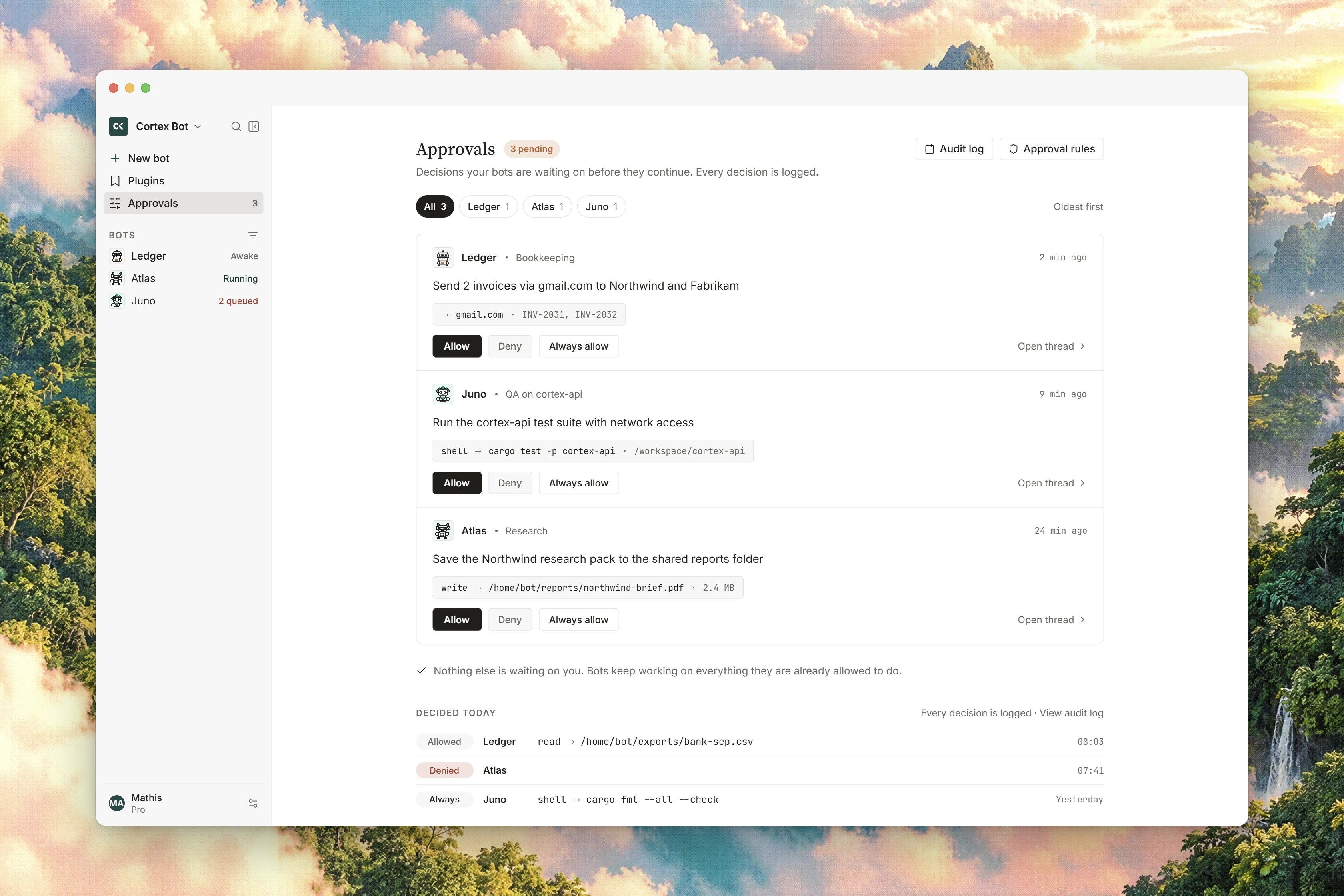
There is also an account-wide **Approvals** page, reachable from the Bot sidebar, which gathers the parked tools of every bot you own into one list with **Allow**, **Deny** and **Always** beside each. Its header counts what is waiting, and with nothing pending it says **Nothing is waiting.** over `Parked tools from every bot land here with Allow, Deny, and Always.`
Beside that list, the **Always allow** rail lists the rules you have written. The rail is read only: it shows you what is in force, and it is not where a rule is removed. A rail that could not load says so, with `Could not load Always rules.` or `Some Always rules could not be loaded.`, and that is never the same thing as having no rules.
In the sidebar, a bot holding a parked tool shows a small amber marker where its status word would be, labelled `Pending approval`. The bot command palette lists the same items under **Waiting on you**, but selecting one takes you to it rather than deciding it.
## When a request cannot be settled
Occasionally a row cannot be acted on, and the surface says `This request cannot be settled from here.` rather than guessing. That happens when the request has no message to settle against, and the same caution applies elsewhere: a decision is offered only when there is a real pending call behind it and a reason to show you. If a decision fails to send you are told plainly with `The decision could not be sent.`, and the tool stays parked.
## Related
* [Bot tools](/bot/tools) - the whole catalog, with what asks and what does not.
* [Talking to a bot](/bot/conversations) - where the widget appears and what else blocks a turn.
* [Inbox](/bot/inbox) - working through everything that needs you.
* [Connected apps and secrets](/bot/plugins) - per-bot app assignment and the vault.
* [Bot troubleshooting](/bot/troubleshooting) - parked steps that will not clear.
## The three choices
One sentence from the product carries the whole model: `Allow runs the parked tool. Deny does not. Always writes a rule.`
| Choice | What happens |
| ---------- | ----------------------------------------------------------------------------------------------------- |
| **Allow** | The parked tool runs, this once, with the real arguments, and the turn continues from the real result |
| **Deny** | The tool does not run and nothing is written. The bot is told why and can propose something else |
| **Always** | Writes a rule so that tool does not ask again on this bot, then runs it |
**Allow** is not "continue" and it is not a preview. It executes the exact call you are looking at. **Deny** never writes a rule, so the same tool will ask again next time, and **Allow** does not stop the asking either: only **Always** changes what happens next. The widget states its own scope, `Always grants this tool for this Bot until its approval rule is removed.`, and the Approvals page repeats it as `Always skips Ask the next time this bot uses that tool.`
Approving is not a way around a block. If a rule denies that tool between the moment it parked and the moment you choose, the call is evaluated again and refused. An approval is consent, not an override.
## Read before you choose
The widget asks `Allow {tool}?` and shows the bot's reason underneath.
The parked arguments are shown in full: the command, the path, the text it wants to type. This is the one place they are displayed, so this is where you check them.
The live desktop shows the state the bot is actually in. See [Computer](/bot/computer).
**Allow**, **Deny** or **Always**. Nothing times out into a silent yes, and a parked tool waits as long as it takes.
## Which tools always ask
Eleven tools always ask before they run: `shell`, `write`, `edit`, `code_agent`, `browser`, `grounded_click`, `type`, `hotkey`, `drag`, `open_app` and `switch_app`.
Twenty never ask: `read`, `screenshot`, `scroll`, `wait`, `save_note`, `web_search`, `web_fetch`, `ask_user`, `secret_request`, `send_to_user`, `notify`, `update_memory`, `skill`, `routine`, `task`, `send_to_agent`, `create_agent`, `create_channel`, `read_artifact` and `grep_artifact`.
A tool on neither list is allowed to run. The two lists are the shipped policy rather than a heuristic, and they read as one sentence: anything that changes a file, runs a command, or moves the mouse or keyboard asks first, while looking, waiting, remembering and talking do not. The full catalog with an **Always asks** column is on [Bot tools](/bot/tools).
Connected-app tools are handled on their own terms. A mutating action asks, a read-only call passes, and an always-allow rule has to name that exact tool: a rule for a whole app or a whole category is refused, so an app you added for one harmless action cannot quietly inherit an auto-run you never saw. Turning an app on for a bot never offers always-allow in the first place, which the form states as `Always-allow is not offered. Ask each time or leave it off.`
## The automatic tool policy
Above those lists sits a policy that is consulted before every tool call, one call at a time, and re-read before every round of the turn. A rule you write while the bot is mid-turn therefore applies to its next call rather than its next task.
Each call gets one of three verdicts, and each verdict carries a readable reason that reaches you and the bot.
| Verdict | What happens |
| ------- | --------------------------------------------------------------------------- |
| Run | The call executes |
| Deny | The call does not execute, and the bot is told why |
| Pause | The call is parked and you get the **Allow** / **Deny** / **Always** widget |
Rules come from three tiers, strictest first.
| Tier | Who writes it | What it can do |
| ------------- | ------------------------------------------- | ------------------------------------------------------------------------------------------------------------------------------ |
| Administrator | Cortex, for a deployment or an organisation | Deny, require approval as a ceiling nobody below can lift, or allow something outright |
| Owner | You, per bot | Deny, require approval, or always-allow |
| Default | The deployment | Looking, waiting, remembering and talking run; anything that changes the computer asks, and so does every connected-app action |
Within a tier the most specific match wins: a rule about one tool beats a rule about a connector, which beats a rule about a category. An administrator's deny or required approval cannot be lifted by an owner rule, so if a deployment has decided a bot may not run shell commands, no **Always** of yours will change that.
The administrator tier is written by Cortex today. There is no customer-facing screen for it, so if you need a deployment-wide ceiling, ask Cortex rather than looking for a setting.
## When the policy refuses instead of asking
The policy fails closed by design. These are the cases where a call is refused rather than parked:
* A tool the bot never offered is denied outright. A name that was not declared is not a tool.
* A rule shape this build does not understand matches nothing, rather than matching everything.
* If your rules cannot be read at all, the round is refused rather than run on a stale copy.
* If the decision cannot be recorded, the call is refused: `The tool policy could not record this call, so it was refused.`
* A rule's reason that looks like a credential is refused when you write it.
Every decision is recorded, newest first, and only the bot's owner can read it. The trail holds the tool name, the verdict, which tier decided, the reason and the deciding rule. It never holds the arguments, which is why the widget is the only place you see those. Entries are kept for 90 days.
## Where pending approvals show up
The widget appears in the bot's thread, in the order the turn reached it.
A row per bot that needs you, with **Approve**, **Edit first** and **Deny** on the spot.
There is also an account-wide **Approvals** page, reachable from the Bot sidebar, which gathers the parked tools of every bot you own into one list with **Allow**, **Deny** and **Always** beside each. Its header counts what is waiting, and with nothing pending it says **Nothing is waiting.** over `Parked tools from every bot land here with Allow, Deny, and Always.`
Beside that list, the **Always allow** rail lists the rules you have written. The rail is read only: it shows you what is in force, and it is not where a rule is removed. A rail that could not load says so, with `Could not load Always rules.` or `Some Always rules could not be loaded.`, and that is never the same thing as having no rules.
In the sidebar, a bot holding a parked tool shows a small amber marker where its status word would be, labelled `Pending approval`. The bot command palette lists the same items under **Waiting on you**, but selecting one takes you to it rather than deciding it.
## When a request cannot be settled
Occasionally a row cannot be acted on, and the surface says `This request cannot be settled from here.` rather than guessing. That happens when the request has no message to settle against, and the same caution applies elsewhere: a decision is offered only when there is a real pending call behind it and a reason to show you. If a decision fails to send you are told plainly with `The decision could not be sent.`, and the tool stays parked.
## Related
* [Bot tools](/bot/tools) - the whole catalog, with what asks and what does not.
* [Talking to a bot](/bot/conversations) - where the widget appears and what else blocks a turn.
* [Inbox](/bot/inbox) - working through everything that needs you.
* [Connected apps and secrets](/bot/plugins) - per-bot app assignment and the vault.
* [Bot troubleshooting](/bot/troubleshooting) - parked steps that will not clear.