> ## Documentation Index
> Fetch the complete documentation index at: https://docs.cortex.foundation/llms.txt
> Use this file to discover all available pages before exploring further.
# Deep Research
> Plan the questions, read live sources, and get a report with numbered citations you can open in a reader and save to Library.
**Deep Research** turns one question into a research run. Instead of a single answer, Cortex Chat writes a plan, reads live sources for each question in parallel, and produces a report whose sentences carry numbered citations. It is worth the wait when the answer has to be defensible: a market scan, a comparison, a timeline, anything you will forward to someone who will ask where a number came from.
The run has three phases, and you are in control between the first and the second. This page covers turning it on, reviewing and editing the plan, scoping which sources may be cited, what you can do while it runs, how to read the report and its citations, saving it as a file, and the limits.
## Turn it on
Open the model chip's panel under the composer and switch on **Deep Research**, listed under the **THINKING** heading as `Plan the questions, read live sources and write a cited report.` While it is on, the chip's detail line reads `· Deep Research`.
From an empty Home screen, the **Research** app card does the same thing and seeds the ask for you.
Then describe what you want to know. The more specific the ask, the sharper the plan.
## Review the plan
Nothing is searched until you say so. Cortex first writes a **Research plan** on the thread: a **Plan title**, a numbered list of **Research questions**, a labelled **Outline**, and a small **Plan diagram** of the approach.
* Edit any question in place, or use **Add a question** and type into `Another question`. A counter reads `{count} of {max} questions`.
* Remove questions you do not care about. Fewer, sharper questions beat a long list.
* The plan survives a page reload, so you can leave it and come back.
* When you are happy, choose **Start research**. The plan disappears from the thread once the run begins.
## Scope it with Trusted sources
**Trusted sources** is the scoping control, and its own line explains the rule: `Only these hosts, connected apps, and project files are cited. Leave hosts empty to search the open web.`
| Field | What it does |
| ------------------- | --------------------------------------------------------------------------------------------- |
| **Allowed hosts** | Hostnames the run may cite, for example `example.com`. Leave it empty to search the open web. |
| **Project files** | Folds a project's files and instructions into the run. |
| **Trusted domains** | The list as it stands for this run. |
Hostnames only, and at most five. A URL is not a hostname, and the refusals say so: `Use hostnames only — not URLs, IP addresses, or more than five names.` If you have narrowed the list to nothing you get `Add at least one hostname before starting. An empty list does not search the web.`
You can also say that no connected app should be consulted. Where you have none attached to Chat, the panel reads `No connected apps on Chat.`
When a run was scoped, the report tells the reader: `Citations are shown only when they match the trusted domains for this run.`
## While it runs
Progress is a short status line, not a wall of tool rows. **Research progress** moves through `Queued`, `Searching`, `Reading`, and then `Done` or `Failed`, and the line beside it uses a small fixed vocabulary: `Planning the research`, `Searching the web`, `Reading sources`, `Checking {topic}`, `Filling gaps`, `Writing the report`, `Checking connected apps`. The eyebrow above the block reads `Deep Research · Running`.
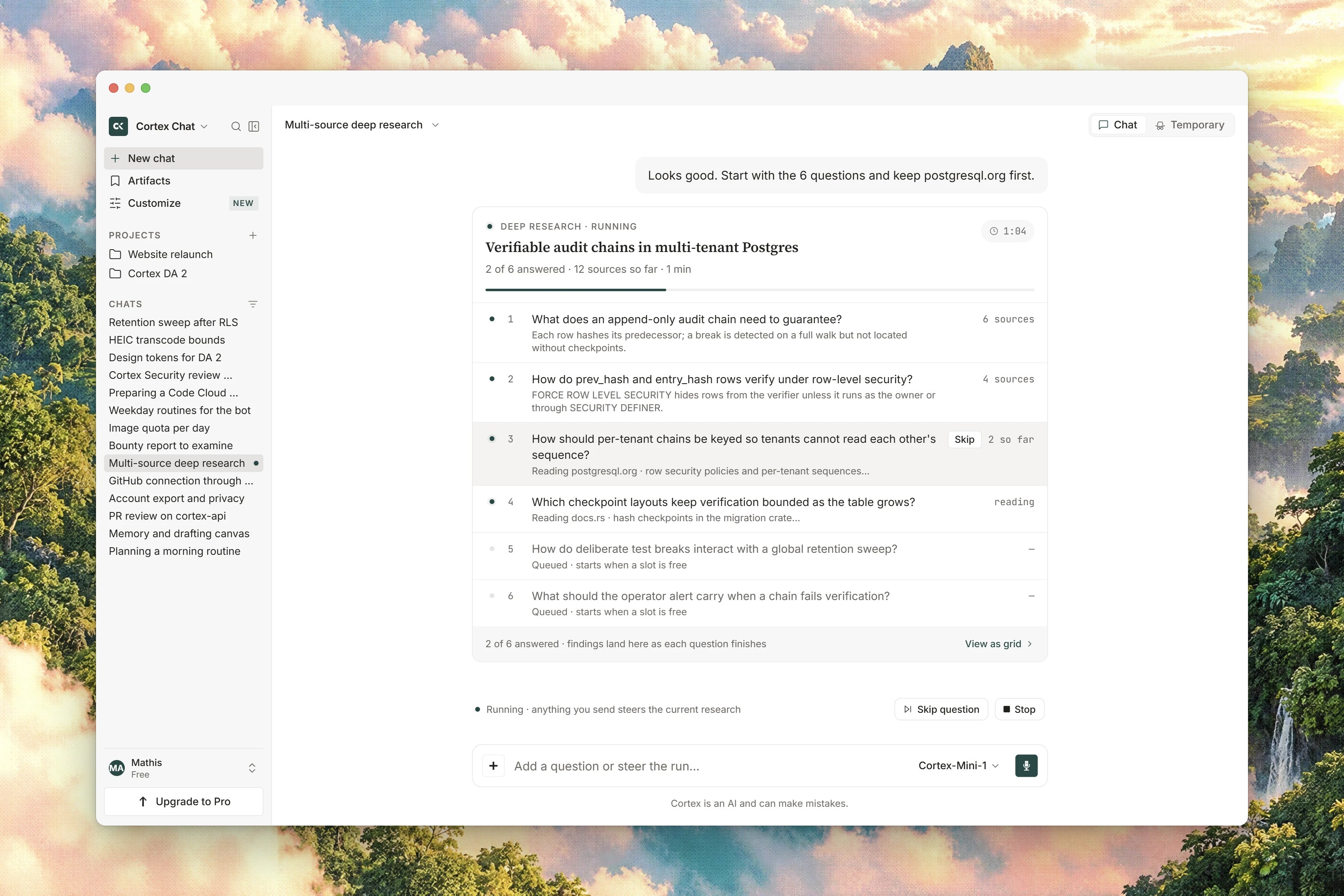 Two controls are yours while it works:
* **Stop** ends the run.
* **Write with what you have** tells Cortex to stop searching and write the report from what it has already found. Use it when the status line has been grinding through the long tail of a question you no longer need.
Several questions are worked on at once, and tools that would *write* anything are never used during a research run.
## Read the report
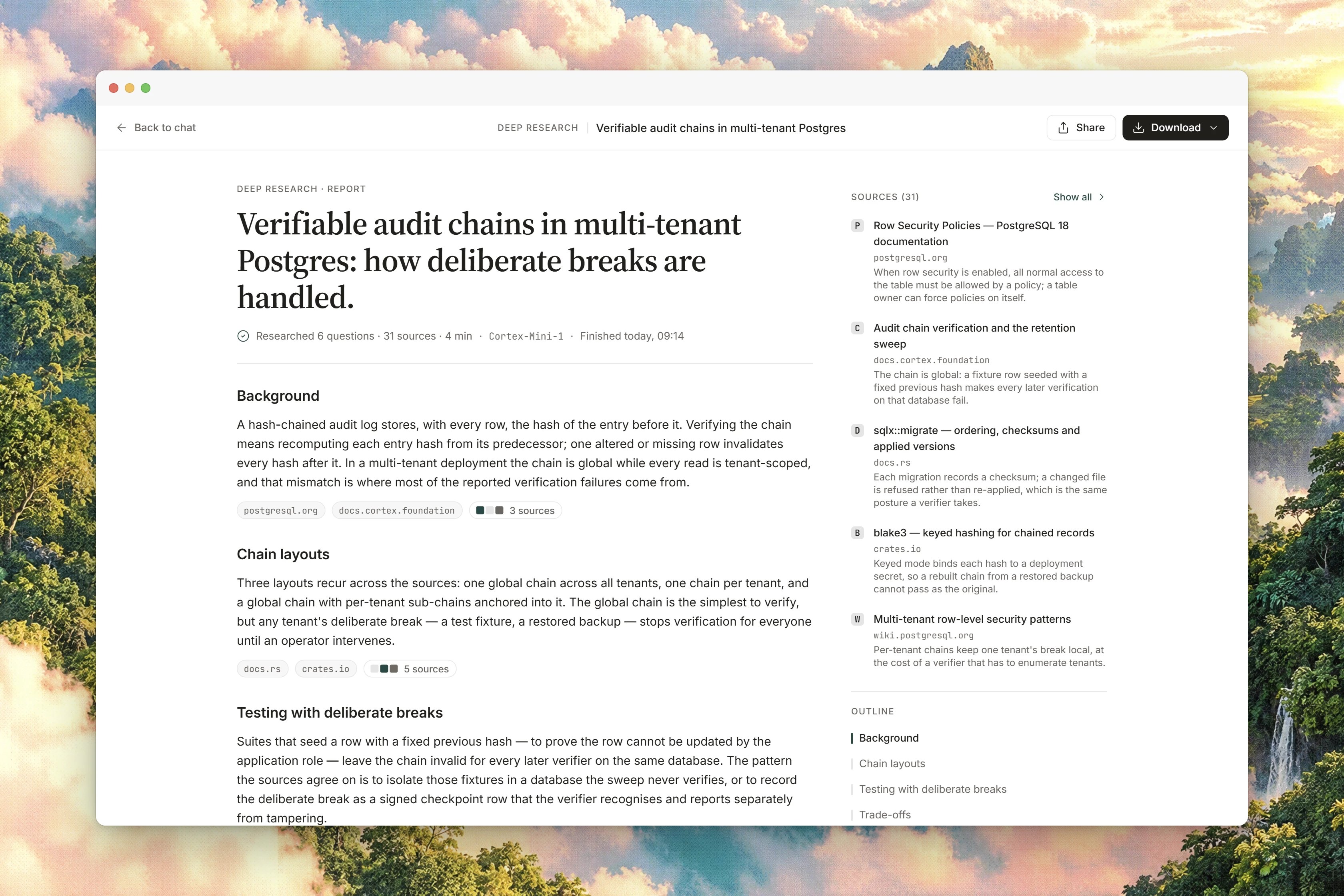
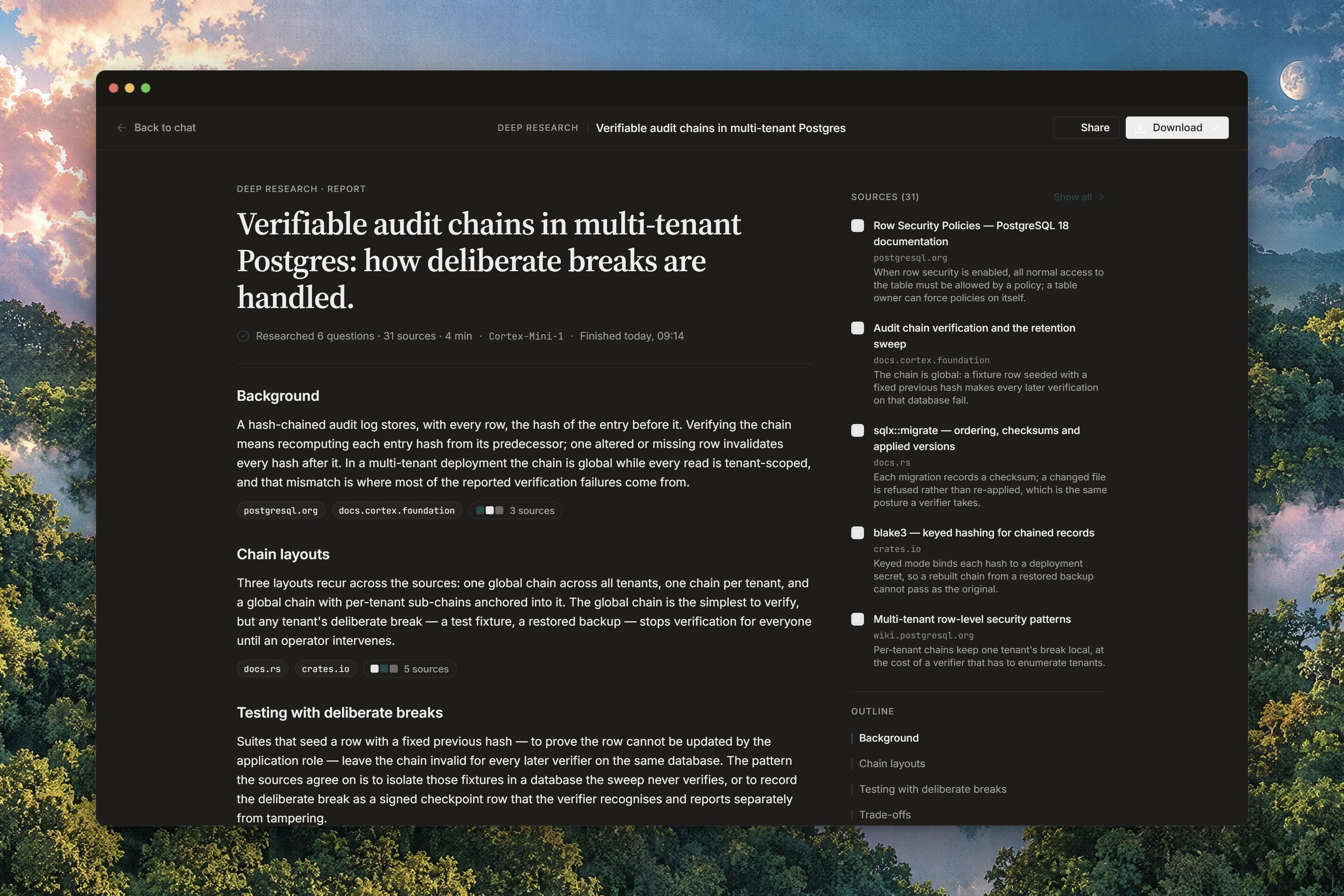
The finished report is ordinary Chat text with **numbered citations**, under the eyebrow `Deep Research · Report`. Each citation carries the page's title, its domain, and the sentence it supports, and the **Sources** list is grouped into `Web`, `Connected apps` and `Project`. Every report ends with the disclosure sentence, `This report was generated by Cortex Chat Deep Research.`
**Open reader** opens the report on its own, away from the thread, and **Follow up** takes you straight back into the chat with it in hand. **Close report** returns you to the conversation.
Where a run cited nothing you see `No sources were cited.` or `No sources recorded for this report.` rather than an invented list.
## Save the report as a file
The report card carries an **Export** menu with four items: `Markdown` (`.md`), `PDF`, `Word` and `Deck`.
Each format stays disabled until the server reports it as available, and the card starts with all four off. On a deployment that has enabled none of them you get no options rather than an empty file, so do not count on a download being there. **Markdown** is the one format that is implemented today. PDF, Word and Deck are listed but answer `This format is not available yet.`, and the menu's own footer says so: `Markdown is ready now. Other formats stay listed until they ship.`
When an export does run, it saves into your [Library](/chat/library) rather than downloading to your machine, confirmed with `Saved to Library as {filename}.` and findable under the Library's **Reports** filter. The report card shows **In Library** once it is there.
Two more conditions apply. Export stays off until the report cites at least one source, `Export stays off until this report cites at least one source.`, and a guest is asked to sign in first, `Sign in to export this report.` Exports also draw on a daily allowance that depends on your plan; see [Export documents](/chat/document-export) and [Plans and quotas](/getting-started/plans).
## Limits
| Limit | Value |
| ---------------------------- | ------------------------------ |
| Questions per plan | 32. A 33rd is refused |
| Sources per run | 80 |
| Questions worked in parallel | 8 |
| Page fetches per question | 4 |
| Time per question | 180 seconds |
| Report length | a budget of about 6,000 tokens |
| Trusted hosts | at most 5, hostnames only |
| Export formats implemented | Markdown only |
Deep Research runs on a Chat conversation. It is refused on a Cortex Code conversation, where the tools are a session's own. Guests may run it, though they cannot export the result.
## When it cannot run
The run could not get out to the open web at all. Retry. If it persists, check [status.cortex.foundation](https://status.cortex.foundation).
The reader could not fetch the report. Return to the thread, where the report block itself is still there, and open it again.
You chose PDF, Word or Deck. Choose **Markdown**, the format that is implemented.
Check that the report cites at least one source and that you are signed in. Both turn the menu off.
## Related
* [Models and thinking](/chat/models) - the chip panel where Deep Research is switched on.
* [Built-in tools](/chat/tools) - the ordinary tool loop a research run replaces.
* [Library](/chat/library) - where an exported report is saved.
* [Export documents](/chat/document-export) - the formats Chat can produce and the daily allowance.
* [Connectors](/chat/plugins) - connected apps a run may consult and cite.
* [Planning](/chat/plans) - turn a report into a task list.
Two controls are yours while it works:
* **Stop** ends the run.
* **Write with what you have** tells Cortex to stop searching and write the report from what it has already found. Use it when the status line has been grinding through the long tail of a question you no longer need.
Several questions are worked on at once, and tools that would *write* anything are never used during a research run.
## Read the report
The finished report is ordinary Chat text with **numbered citations**, under the eyebrow `Deep Research · Report`. Each citation carries the page's title, its domain, and the sentence it supports, and the **Sources** list is grouped into `Web`, `Connected apps` and `Project`. Every report ends with the disclosure sentence, `This report was generated by Cortex Chat Deep Research.`
**Open reader** opens the report on its own, away from the thread, and **Follow up** takes you straight back into the chat with it in hand. **Close report** returns you to the conversation.
Where a run cited nothing you see `No sources were cited.` or `No sources recorded for this report.` rather than an invented list.
## Save the report as a file
The report card carries an **Export** menu with four items: `Markdown` (`.md`), `PDF`, `Word` and `Deck`.
Each format stays disabled until the server reports it as available, and the card starts with all four off. On a deployment that has enabled none of them you get no options rather than an empty file, so do not count on a download being there. **Markdown** is the one format that is implemented today. PDF, Word and Deck are listed but answer `This format is not available yet.`, and the menu's own footer says so: `Markdown is ready now. Other formats stay listed until they ship.`
When an export does run, it saves into your [Library](/chat/library) rather than downloading to your machine, confirmed with `Saved to Library as {filename}.` and findable under the Library's **Reports** filter. The report card shows **In Library** once it is there.
Two more conditions apply. Export stays off until the report cites at least one source, `Export stays off until this report cites at least one source.`, and a guest is asked to sign in first, `Sign in to export this report.` Exports also draw on a daily allowance that depends on your plan; see [Export documents](/chat/document-export) and [Plans and quotas](/getting-started/plans).
## Limits
| Limit | Value |
| ---------------------------- | ------------------------------ |
| Questions per plan | 32. A 33rd is refused |
| Sources per run | 80 |
| Questions worked in parallel | 8 |
| Page fetches per question | 4 |
| Time per question | 180 seconds |
| Report length | a budget of about 6,000 tokens |
| Trusted hosts | at most 5, hostnames only |
| Export formats implemented | Markdown only |
Deep Research runs on a Chat conversation. It is refused on a Cortex Code conversation, where the tools are a session's own. Guests may run it, though they cannot export the result.
## When it cannot run
The run could not get out to the open web at all. Retry. If it persists, check [status.cortex.foundation](https://status.cortex.foundation).
The reader could not fetch the report. Return to the thread, where the report block itself is still there, and open it again.
You chose PDF, Word or Deck. Choose **Markdown**, the format that is implemented.
Check that the report cites at least one source and that you are signed in. Both turn the menu off.
## Related
* [Models and thinking](/chat/models) - the chip panel where Deep Research is switched on.
* [Built-in tools](/chat/tools) - the ordinary tool loop a research run replaces.
* [Library](/chat/library) - where an exported report is saved.
* [Export documents](/chat/document-export) - the formats Chat can produce and the daily allowance.
* [Connectors](/chat/plugins) - connected apps a run may consult and cite.
* [Planning](/chat/plans) - turn a report into a task list.