> ## Documentation Index
> Fetch the complete documentation index at: https://docs.cortex.foundation/llms.txt
> Use this file to discover all available pages before exploring further.
# Image generation
> Ask Cortex Chat for a picture, follow the card as it generates, and find the finished image in your Library with its prompt and seed.
Ask **Cortex Chat** for a picture in plain language and it writes the picture prompt for you before anything is generated. What comes back is a single card in the conversation that moves through its states, plus a file in your **Library** that keeps the prompt you typed and the seed that produced it. The image model is **Cortex-Image-1**.
This page covers asking for a picture, reading the card, steering the size and the seed, where the finished file lands, how many images each plan includes per day, and the cases where nothing runs at all.
 ## Ask for a picture
Write what you want as a sentence rather than a list of keywords. You can attach reference files on the same turn: a Chat turn takes at most four attachments, and each file has to be within the 10 MB per-upload ceiling, which is the same for everyone whatever your plan.
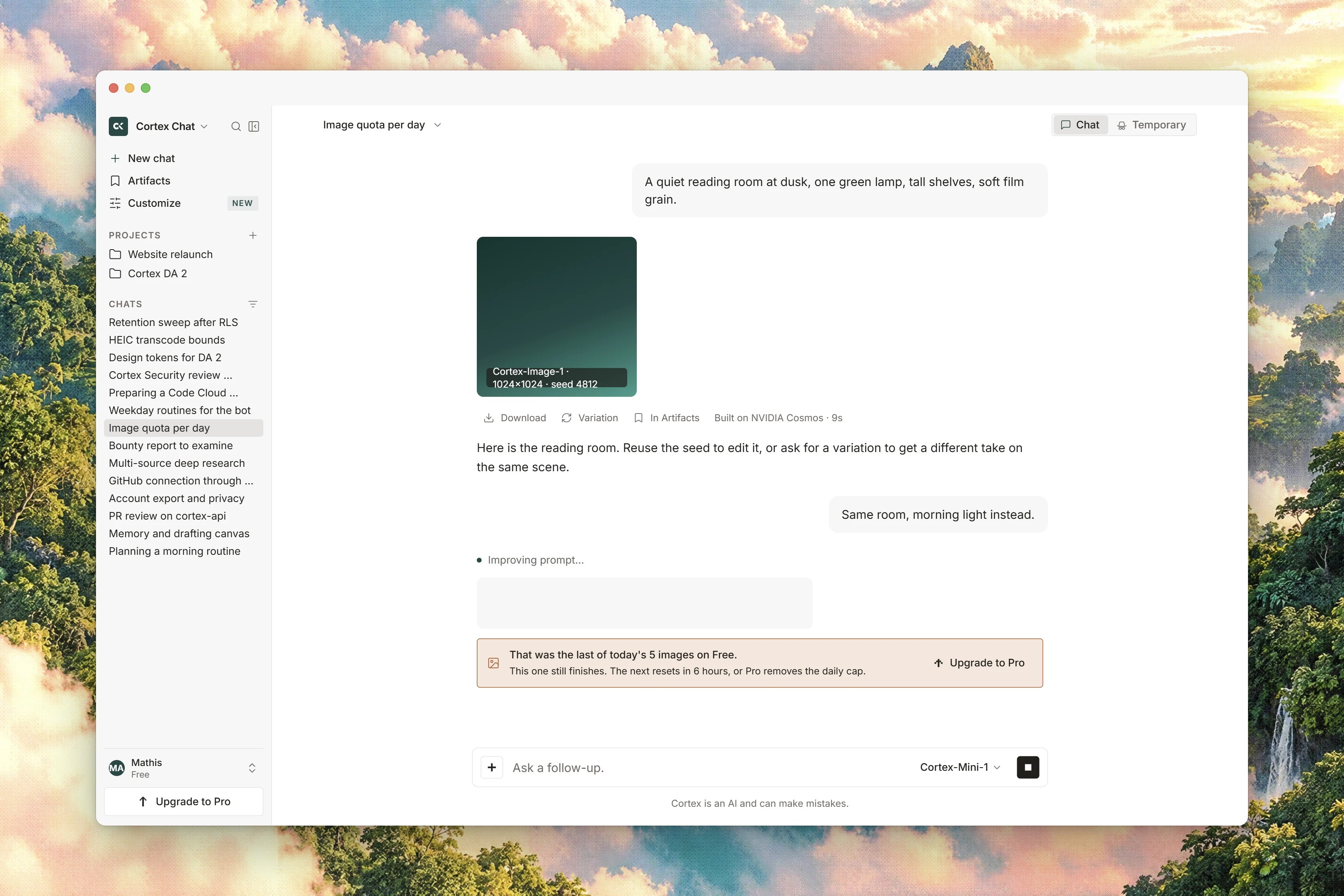
The card first shows **Improving prompt…**, while Cortex turns your ask into a complete scene description, then **Generating image…** while the picture is made.
The tile fills with the picture and the caption gives the model name and how long it took, as `Cortex-Image-1 · {seconds}s`. Elsewhere the same result is labelled `Generated with Cortex-Image-1`.
Asking for another picture adds a card instead of replacing the first one, so a run of attempts stacks down the thread in the order you asked for them.
## What the card shows
| State | What you see |
| ---------- | ---------------------------------------------------------------------------------------------------------------- |
| Queued | The caption `Improving prompt…` and a small spinner, with no tile yet. |
| Generating | The tile with a progress ring and the caption `Generating image…`. |
| Done | The picture, with `Cortex-Image-1 · {seconds}s` under it. |
| Error | `The image couldn't be generated.`, the line `Nothing was counted.`, a short code and request id, and **Retry**. |
**Retry** re-runs whichever step failed, the prompt rewrite or the generation. Where neither can be re-run, the button is absent rather than present and dead.
A card that reads done means the generation finished, not that the picture has painted: the tile fills once the file arrives from your Library. Closing the conversation settles any generation still in flight.
## Steer the result
You can set the following on the ask itself.
| Control | What it does |
| --------------- | -------------------------------------------------------------------------------------------------------------------------------------------------------------- |
| Size | One of four shapes: square `1024x1024`, landscape `1792x1024`, portrait `1024x1792`, or a small square `512x512`. |
| Seed | Any number from zero upwards. The same prompt with the same seed gives you the same picture again. A negative seed is refused before any allowance is touched. |
| Things to avoid | What you want kept out of the frame. |
| Steps | 1 to 50. More steps means more detail and more time. |
| Guidance | 0 to 20. How closely the picture follows the prompt. |
Cortex gives the prompt rewrite about 45 seconds and the generation itself about two and a half minutes. Past that the card reports the error instead of waiting indefinitely.
## Where the image lands
The finished picture is saved to your **Library** as a generated file, and it does not spend your per-upload allowance the way an upload does. From there you can reuse it in another chat or attach it to a project.
The card and the Library keep the picture's provenance: **the prompt you typed** and **the seed**, never the rewritten prompt Cortex generated from it.
* **Image history** on the card shows the prompt, the seed, the size and the date.
* **Reuse seed** puts the prompt and the seed back in the composer, so you can change one thing and try again rather than generating from the dialog.
## Included images per day
Image generation is metered per day, and the allowance depends on your plan. The Go plan's figure is not published, so this page will not invent one: check **Settings → Plan & billing** on a Go account for what it allows.
| Plan | Included images per day |
| ----- | ----------------------- |
| Guest | 2 |
| Free | 15 |
| Go | Not published |
| Plus | 100 |
| Pro | Unlimited |
When a generation fails, nothing is counted. The card says so, and where the allowance is known it says how much is left, as `Nothing was counted — {remaining} of {limit} included images left today on {plan}.` The prompt rewrite spends the allowance before the generation runs, which is exactly why a failure has to give it back.
When the day's allowance is gone, the turn stops with [`quota_exceeded`](/problems/quota_exceeded) rather than generating a lesser picture.
## When nothing runs
* **A web address in the prompt.** A prompt that contains a link is refused before either step. Neither the rewrite nor the generation happens, and nothing is counted. Describe the reference instead, or attach the file.
* **An attachment the turn cannot read.** PNG, JPEG, WebP, GIF, PDF, JSON and ordinary text types are accepted; HTML, XML and JavaScript are not, and SVG is refused.
* **A deployment without image generation.** Where the image stack is not configured, the tool is simply not offered in the turn.
A generated picture is an ordinary Library file. If you want to know whether a picture reads as camera-made or generated, that is a separate ask: see [Origin check](/chat/origin-check). It never runs by itself after a generation.
## Related
* [Library](/chat/library) is where generated pictures are kept.
* [Attachments and files](/chat/attachments) covers the per-turn and per-file limits.
* [Origin check](/chat/origin-check) answers whether a photo or clip is authentic.
* [Built-in tools](/chat/tools) lists what else a Chat turn can call.
* [Plans and quotas](/getting-started/plans) has the per-plan allowances in one place.
## Ask for a picture
Write what you want as a sentence rather than a list of keywords. You can attach reference files on the same turn: a Chat turn takes at most four attachments, and each file has to be within the 10 MB per-upload ceiling, which is the same for everyone whatever your plan.
The card first shows **Improving prompt…**, while Cortex turns your ask into a complete scene description, then **Generating image…** while the picture is made.
The tile fills with the picture and the caption gives the model name and how long it took, as `Cortex-Image-1 · {seconds}s`. Elsewhere the same result is labelled `Generated with Cortex-Image-1`.
Asking for another picture adds a card instead of replacing the first one, so a run of attempts stacks down the thread in the order you asked for them.
## What the card shows
| State | What you see |
| ---------- | ---------------------------------------------------------------------------------------------------------------- |
| Queued | The caption `Improving prompt…` and a small spinner, with no tile yet. |
| Generating | The tile with a progress ring and the caption `Generating image…`. |
| Done | The picture, with `Cortex-Image-1 · {seconds}s` under it. |
| Error | `The image couldn't be generated.`, the line `Nothing was counted.`, a short code and request id, and **Retry**. |
**Retry** re-runs whichever step failed, the prompt rewrite or the generation. Where neither can be re-run, the button is absent rather than present and dead.
A card that reads done means the generation finished, not that the picture has painted: the tile fills once the file arrives from your Library. Closing the conversation settles any generation still in flight.
## Steer the result
You can set the following on the ask itself.
| Control | What it does |
| --------------- | -------------------------------------------------------------------------------------------------------------------------------------------------------------- |
| Size | One of four shapes: square `1024x1024`, landscape `1792x1024`, portrait `1024x1792`, or a small square `512x512`. |
| Seed | Any number from zero upwards. The same prompt with the same seed gives you the same picture again. A negative seed is refused before any allowance is touched. |
| Things to avoid | What you want kept out of the frame. |
| Steps | 1 to 50. More steps means more detail and more time. |
| Guidance | 0 to 20. How closely the picture follows the prompt. |
Cortex gives the prompt rewrite about 45 seconds and the generation itself about two and a half minutes. Past that the card reports the error instead of waiting indefinitely.
## Where the image lands
The finished picture is saved to your **Library** as a generated file, and it does not spend your per-upload allowance the way an upload does. From there you can reuse it in another chat or attach it to a project.
The card and the Library keep the picture's provenance: **the prompt you typed** and **the seed**, never the rewritten prompt Cortex generated from it.
* **Image history** on the card shows the prompt, the seed, the size and the date.
* **Reuse seed** puts the prompt and the seed back in the composer, so you can change one thing and try again rather than generating from the dialog.
## Included images per day
Image generation is metered per day, and the allowance depends on your plan. The Go plan's figure is not published, so this page will not invent one: check **Settings → Plan & billing** on a Go account for what it allows.
| Plan | Included images per day |
| ----- | ----------------------- |
| Guest | 2 |
| Free | 15 |
| Go | Not published |
| Plus | 100 |
| Pro | Unlimited |
When a generation fails, nothing is counted. The card says so, and where the allowance is known it says how much is left, as `Nothing was counted — {remaining} of {limit} included images left today on {plan}.` The prompt rewrite spends the allowance before the generation runs, which is exactly why a failure has to give it back.
When the day's allowance is gone, the turn stops with [`quota_exceeded`](/problems/quota_exceeded) rather than generating a lesser picture.
## When nothing runs
* **A web address in the prompt.** A prompt that contains a link is refused before either step. Neither the rewrite nor the generation happens, and nothing is counted. Describe the reference instead, or attach the file.
* **An attachment the turn cannot read.** PNG, JPEG, WebP, GIF, PDF, JSON and ordinary text types are accepted; HTML, XML and JavaScript are not, and SVG is refused.
* **A deployment without image generation.** Where the image stack is not configured, the tool is simply not offered in the turn.
A generated picture is an ordinary Library file. If you want to know whether a picture reads as camera-made or generated, that is a separate ask: see [Origin check](/chat/origin-check). It never runs by itself after a generation.
## Related
* [Library](/chat/library) is where generated pictures are kept.
* [Attachments and files](/chat/attachments) covers the per-turn and per-file limits.
* [Origin check](/chat/origin-check) answers whether a photo or clip is authentic.
* [Built-in tools](/chat/tools) lists what else a Chat turn can call.
* [Plans and quotas](/getting-started/plans) has the per-plan allowances in one place.