> ## Documentation Index
> Fetch the complete documentation index at: https://docs.cortex.foundation/llms.txt
> Use this file to discover all available pages before exploring further.
# Permissions and approvals
> Commands ask with Allow once, Always allow and Deny. File writes never use that rail: they wait in Changes for a human Approve.
Cortex Code stops and asks before it does something consequential. There are **two separate gates**, and they use different words on purpose: a command that needs a decision raises a card above the transcript with **Allow once**, **Always allow** and **Deny**, while a file write never appears on that card at all and instead waits in the **Changes** pane for a human **Approve**.
Keeping those two apart is the whole point of this page. A session-level **Always allow** on a command never grants a file write, and no approval in Code can be undone after the fact. This page covers both gates, the two narrower consents on top of them (an exact prepared action, and metered spend), who is allowed to decide, and what deliberately does not exist.
## Two gates, side by side
| | Gate 1: a command | Gate 2: a file write |
| --------------------- | -------------------------------------------------------------------- | ------------------------------------------------------------- |
| What it covers | A tool call that needs a decision, including running a shell command | Writing or editing a file in the repository |
| Where it appears | A card above the transcript | The **Changes** tab in the output pane |
| The words | **Allow once**, **Always allow**, **Deny** | **Approve**, **Approve all**, **Reject** |
| How far a yes reaches | **Always allow** covers that tool for the rest of this session | An approval covers that one write and nothing later |
| If you say no | The turn continues and the model is told it was denied | The file is not written, and your note goes back to the agent |
## Gate 1: a command that needs a decision
When a tool call needs your decision, the turn stops and a card appears above the transcript. It carries the tool's name in a warning badge, a one-line summary of what is being asked, and the detail in a monospaced block so you can read the exact command before you answer.
| Button | What it does |
| ---------------- | -------------------------------------------------------------------------------------------------------------------------------------------------------------------------- |
| **Allow once** | Lets that one call proceed. The next similar call asks again. |
| **Always allow** | Stops asking for that tool **in this session**. It is a session grant, not an account setting: it does not carry to another session, to Cortex Chat, or to the Cortex CLI. |
| **Deny** | Refuses the call. The turn keeps going and the model is told the call was denied. A denial is not a crash. |
If a decision cannot be recorded, a toast reads **That decision could not be recorded**. Press the button again.
Treat the three buttons as what the screen offers when a command is put to you, not as a guarantee that every tool in every deployment will stop and ask. The gate you can rely on is the file-write gate below: a write always waits for a human.
## Gate 2: a file write waits in Changes
Writes and edits are deliberately excluded from the card above the transcript. They land in the **Changes** pane as pending files, and **until a human approves one, the tree is not written**.
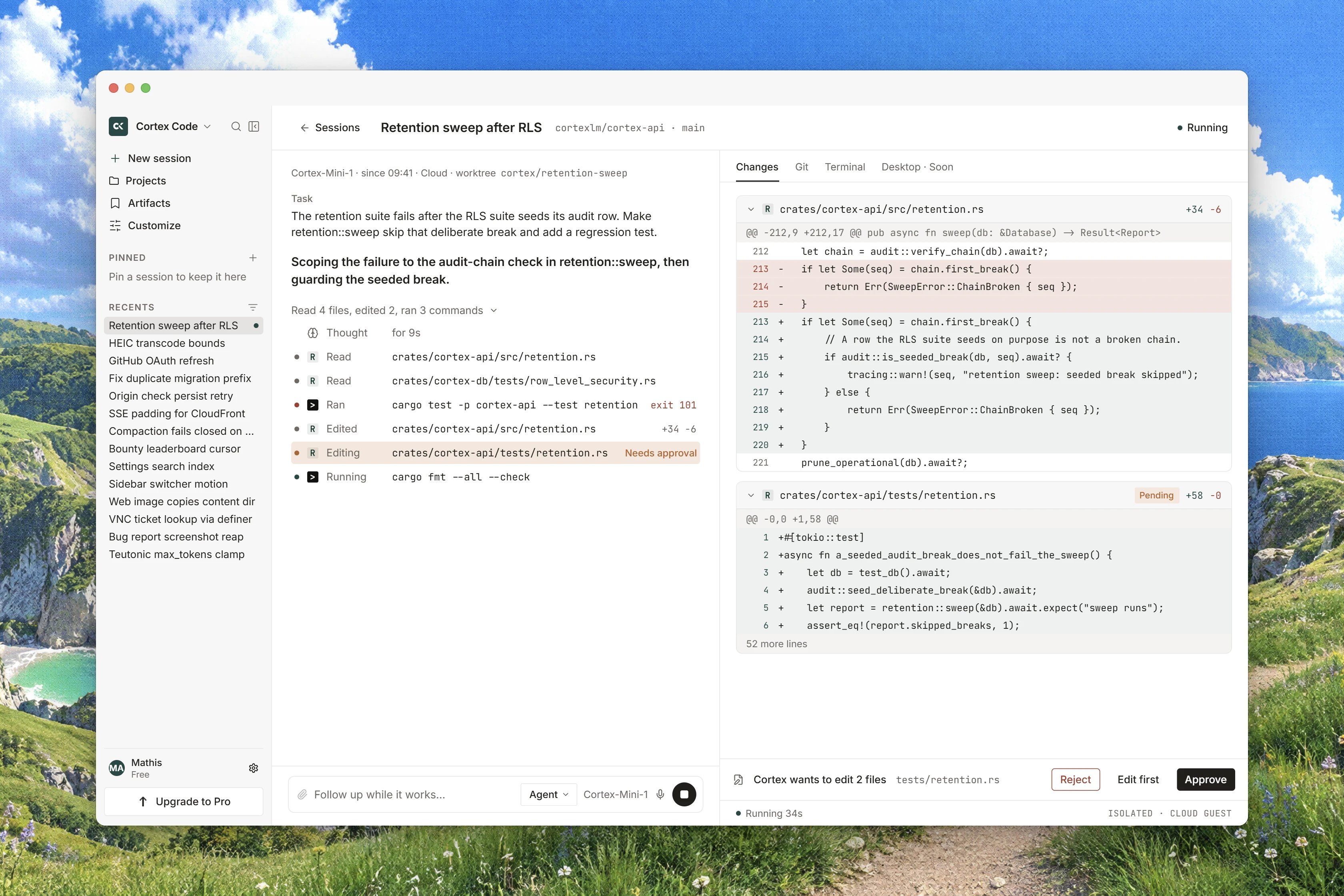 Each file the agent touched is listed with its state: **Queued**, **Writing**, **Pending**, then **Written**.
A pending file is a proposal. Read it before you answer, not after.
Press **Approve** on a file, or **Approve all** for the batch. Press **Reject** to refuse one, and where the surface offers it, say why under **Why reject this write** so the agent reads your reason and can try something else.
Approving grants exactly the write in front of you. In the product's own words: **Always applies this write once. It does not grant every later edit.** There is no grant anywhere in Code that hands the agent standing permission to write files, and an **Always allow** you pressed on a command has no effect here.
In **Ask** or **Plan** the pane reads **Ask and Plan do not change files, so there is nothing to review here.** If the gate itself cannot be read, it says **Pending file writes could not be loaded.** rather than showing an empty list. The full pane, including the difference between a proposed and a landed diff, is documented in [Changes and diffs](/code/changes).
## Exact-action consent
Sometimes an agent finishes a turn with an action already prepared, a push for example. Those appear under the heading **Actions**, with the hint **Bound to this turn · no model**. Pressing one opens a dialog titled **Run this action?** whose body reads **No model turn. The payload was bound when the agent stopped. Cloud guest only.**, with **Allow** and **Deny**.
The distinction matters. **Allow** runs exactly the payload that was frozen when the agent stopped, with no further model turn, so nothing can be reinterpreted between your decision and the action. **Deny** starts nothing at all. The dialog states the accounting plainly: **The press is audited. This action expires with its turn.**
An action carries one of five states: `pending`, `running`, `completed`, `expired` and `denied`. An expired action stays visible rather than disappearing, so you can see what was offered and never taken.
## Spend consent
Metered spend is a third, narrower gate with its own title, **Spend consent**, and its own hint: **Allow this metered spend once, allow up to a budget, or deny it. A decision cannot be changed.** It offers **Allow once**, **Allow up to** with an **Amount** field, and **Deny**. A failure reads **That spend decision could not be recorded**.
As a session approaches the budget you set, a banner reads **Approaching this session's budget**, followed by the amount used against the limit. Recorded cost for the workspace lives on [Usage](/code/usage).
## Who is allowed to decide
* **A viewer who has detached cannot decide.** The header's **Detach** control says so: **You are watching this session. Detach does not stop the turn. Attach again to send or to Allow or Deny.** Detaching never stops a turn; press **Attach** to get the buttons back.
* **Focus does not hide a decision.** Approvals still interrupt while the session is in **Focus**.
* **A guest cannot approve.** Two-person approval exists as a surface, with **People** and a line naming who the session is waiting on, and it states **A guest cannot vote.** How a second reviewer is nominated is not documented yet.
* **The side panel decides nothing.** **Ask on the side** is a scratch pad: **This panel does not run tools, settle approvals, or write Always-allow.**
## What does not exist
**There is no undo, no checkpoint and no revert anywhere in Cortex Code.** Nothing rolls a turn's edits back after they are approved. The moment to refuse a change is while it is still pending in **Changes**, with **Reject**, and the moment to refuse a command is while its card is on screen, with **Deny**.
* **There is no command allowlist and no per-directory allowlist.** Running shell commands is allowed or withheld wholesale: **Agent** has it, **Ask** and **Plan** do not. There is no list of safe commands or safe folders to maintain.
* **There is no workspace-level shell policy.** [Code settings](/code/settings) says it in its own words: a shell-command policy, a network allowlist, a branch prefix and pull-request behaviour are decided per session today, and a session asks before it runs a command so you can allow, always-allow or deny it.
* **Withholding beats approving.** If you do not want a turn to edit or run anything at all, do not rely on denying each prompt: send the turn in **Ask** or **Plan**, where those tools are absent from the catalog the turn is built with. See [Ask, Plan, Agent](/code/interactions).
## Related
* [Changes and diffs](/code/changes) for the write gate in full, per file and per batch.
* [Ask, Plan, Agent](/code/interactions) for withholding a tool instead of refusing it every time.
* [Code sessions](/code/sessions) for attach, detach, stop and follow-ups.
* [Modes and permissions in the CLI](/cli/modes-and-permissions) for the same decisions in a terminal.
* [Security and privacy](/reference/security-and-privacy) for what leaves your repository.
* [Code troubleshooting](/code/troubleshooting) when a decision will not record.
Each file the agent touched is listed with its state: **Queued**, **Writing**, **Pending**, then **Written**.
A pending file is a proposal. Read it before you answer, not after.
Press **Approve** on a file, or **Approve all** for the batch. Press **Reject** to refuse one, and where the surface offers it, say why under **Why reject this write** so the agent reads your reason and can try something else.
Approving grants exactly the write in front of you. In the product's own words: **Always applies this write once. It does not grant every later edit.** There is no grant anywhere in Code that hands the agent standing permission to write files, and an **Always allow** you pressed on a command has no effect here.
In **Ask** or **Plan** the pane reads **Ask and Plan do not change files, so there is nothing to review here.** If the gate itself cannot be read, it says **Pending file writes could not be loaded.** rather than showing an empty list. The full pane, including the difference between a proposed and a landed diff, is documented in [Changes and diffs](/code/changes).
## Exact-action consent
Sometimes an agent finishes a turn with an action already prepared, a push for example. Those appear under the heading **Actions**, with the hint **Bound to this turn · no model**. Pressing one opens a dialog titled **Run this action?** whose body reads **No model turn. The payload was bound when the agent stopped. Cloud guest only.**, with **Allow** and **Deny**.
The distinction matters. **Allow** runs exactly the payload that was frozen when the agent stopped, with no further model turn, so nothing can be reinterpreted between your decision and the action. **Deny** starts nothing at all. The dialog states the accounting plainly: **The press is audited. This action expires with its turn.**
An action carries one of five states: `pending`, `running`, `completed`, `expired` and `denied`. An expired action stays visible rather than disappearing, so you can see what was offered and never taken.
## Spend consent
Metered spend is a third, narrower gate with its own title, **Spend consent**, and its own hint: **Allow this metered spend once, allow up to a budget, or deny it. A decision cannot be changed.** It offers **Allow once**, **Allow up to** with an **Amount** field, and **Deny**. A failure reads **That spend decision could not be recorded**.
As a session approaches the budget you set, a banner reads **Approaching this session's budget**, followed by the amount used against the limit. Recorded cost for the workspace lives on [Usage](/code/usage).
## Who is allowed to decide
* **A viewer who has detached cannot decide.** The header's **Detach** control says so: **You are watching this session. Detach does not stop the turn. Attach again to send or to Allow or Deny.** Detaching never stops a turn; press **Attach** to get the buttons back.
* **Focus does not hide a decision.** Approvals still interrupt while the session is in **Focus**.
* **A guest cannot approve.** Two-person approval exists as a surface, with **People** and a line naming who the session is waiting on, and it states **A guest cannot vote.** How a second reviewer is nominated is not documented yet.
* **The side panel decides nothing.** **Ask on the side** is a scratch pad: **This panel does not run tools, settle approvals, or write Always-allow.**
## What does not exist
**There is no undo, no checkpoint and no revert anywhere in Cortex Code.** Nothing rolls a turn's edits back after they are approved. The moment to refuse a change is while it is still pending in **Changes**, with **Reject**, and the moment to refuse a command is while its card is on screen, with **Deny**.
* **There is no command allowlist and no per-directory allowlist.** Running shell commands is allowed or withheld wholesale: **Agent** has it, **Ask** and **Plan** do not. There is no list of safe commands or safe folders to maintain.
* **There is no workspace-level shell policy.** [Code settings](/code/settings) says it in its own words: a shell-command policy, a network allowlist, a branch prefix and pull-request behaviour are decided per session today, and a session asks before it runs a command so you can allow, always-allow or deny it.
* **Withholding beats approving.** If you do not want a turn to edit or run anything at all, do not rely on denying each prompt: send the turn in **Ask** or **Plan**, where those tools are absent from the catalog the turn is built with. See [Ask, Plan, Agent](/code/interactions).
## Related
* [Changes and diffs](/code/changes) for the write gate in full, per file and per batch.
* [Ask, Plan, Agent](/code/interactions) for withholding a tool instead of refusing it every time.
* [Code sessions](/code/sessions) for attach, detach, stop and follow-ups.
* [Modes and permissions in the CLI](/cli/modes-and-permissions) for the same decisions in a terminal.
* [Security and privacy](/reference/security-and-privacy) for what leaves your repository.
* [Code troubleshooting](/code/troubleshooting) when a decision will not record.