> ## Documentation Index
> Fetch the complete documentation index at: https://docs.cortex.foundation/llms.txt
> Use this file to discover all available pages before exploring further.
# Code sessions
> What a Code session is, how to find and read one, follow-ups, attach and detach, stopping a turn, and what survives when it ends.
A session is where Cortex Code does its work on one repository. It records what you asked, the files the agent read, the edits it proposed, the commands it ran and the plan it wrote when you asked for one. It is a timeline of work rather than a chat transcript, and it stays on your account so you can come back to it.
This page covers the session as an object: how it is named, how to find one again on the sessions board, how to read the transcript and the output pane, how follow-ups and queueing work, what attaching and detaching mean, and what is still there when the turn is over.
## What a session is
* **One repository, one session.** A session works a single repository at a time. A second repository means a second session.
* **Its own isolated worktree.** Each Cloud session gets one, shown on the meta line as **worktree** and the branch name. **New worktree** starts a fresh one.
* **Its title is your prompt.** The first line of what you typed becomes the session title, and a very long line is shortened. You can rename it: hover the title, press the pencil, and the popover saves with **Title saved** or reports **The title could not be saved**. A renamed session updates in the sidebar list too.
* **Untitled until it has one.** A session with no usable title reads **Untitled session**.
* **One model, pinned.** The model is chosen in the composer before you start and shown on the session row and the meta line. What it starts on comes from **Default model** in [Code settings](/code/settings), which a workspace can leave on **Server default**.
* **Cost only when there is cost.** The row shows a spend figure only when the session has a recorded spend, so most rows do not carry one. See [Usage](/code/usage).
* **Where it came from.** A session started from a terminal is marked **· Started from CLI** on the board. See [Code in the terminal](/code/cli).
## Find a session again
**Sessions** is the board of everything on your account. Its description line counts the sessions, the repositories they span and how many are running right now.
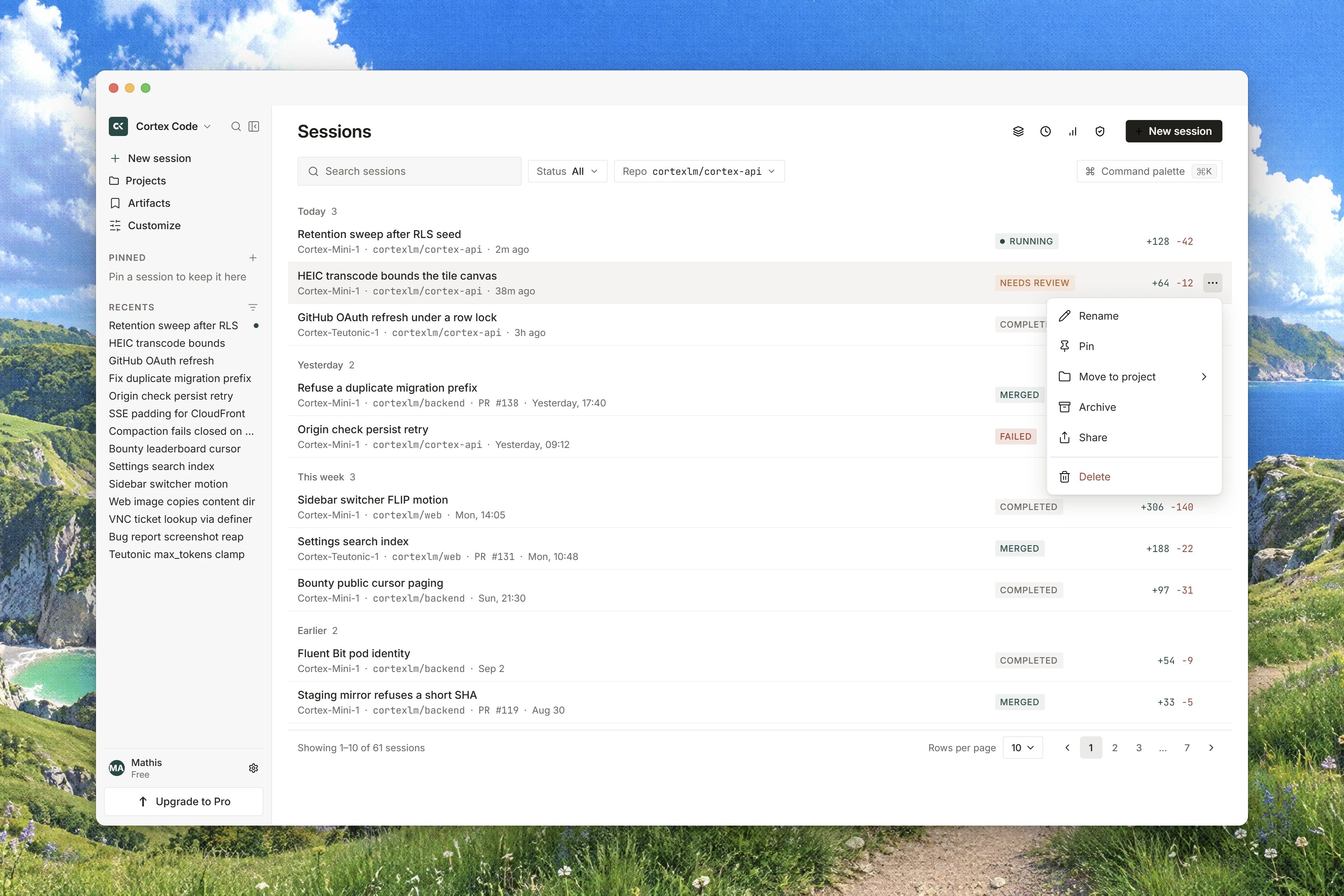 | Control | What it does |
| ------------------- | ------------------------------------------------------------------- |
| **Search** | matches the title, the repository or the branch, case-insensitively |
| **Status** | filters by **All**, **Running**, **Needs review** or **Failed** |
| **Repo** | filters to one of the repositories your sessions actually name |
| **Command palette** | opens the palette, also on Command+K or Ctrl+K |
| **New session** | goes back to the composer on Code Home |
Rows are grouped by **when, not where**: **Today**, **Yesterday**, **This week** and **Earlier**, each with a count. A session whose timestamp cannot be read lands in **Earlier** rather than disappearing from the board.
**Needs review** deliberately covers two different waits: a pull request waiting on a human, and a permission prompt waiting on a decision. Both are the same request of you.
The whole row is the link. There is no card and no separate open button: the title line sits above a line reading the state, the model, the repository and how long ago it ran. When you have no sessions at all the board offers **Start your first session**.
## Read a session
The header carries **Back to sessions**, the title with its rename pencil, the repository and base branch, the session cost, the view controls and the run state, with a small green dot while a turn is running. Nothing else: stopping is done in the composer, and the pull request lives on the **Git** tab. The meta line under it names the model, when it last ran, the runtime and the worktree branch.
The transcript is labelled **Session transcript**. Your ask is drawn as the **Task** line, and the work follows as **Read**, **Edited**, **Ran** and **Worked** rows with durations, plus **Thought** rows where the agent reasoned. A finished row with a lot of output is folded: **Long finished results are folded. Press Ctrl+O to expand every row.** On a Mac, Ctrl+O and Command+O both expand, and expanding is one way; there is no chord to fold them back. Before anything has run the column reads **Nothing has run in this session yet. Describe a task below and Cortex will start work.**
To the right, **Session output** carries the tabs.
| Tab | What is on it |
| ------------ | ---------------------------------------------------------------------------- |
| **Changes** | the files this session wants to write, and the **Approve** gate on them |
| **Diff** | the attached runtime's working tree, captioned **Live from the Cloud guest** |
| **Git** | **Open pull request**, or **No pull request** and **No branch yet** |
| **Terminal** | what ran, or **No commands have run in this session yet.** |
| **Plan** | present only when the session has a plan |
| **Runtime** | the environment panel for this session |
| **Tools** | the tool servers this session can reach, which for a Code session is none |
| **Desktop** | drawn with the badge **Soon**; it does not exist yet |
See [Changes and diffs](/code/changes) for the two panes that matter most.
## Send a follow-up
The follow-up box floats at the bottom of the transcript, labelled **Follow-up**, with the placeholder **Ask a follow-up or adjust the plan…** Enter sends and Shift+Enter inserts a newline. It carries the same mode menu as the composer, so **Ask**, **Plan** and **Agent** can change on every turn, and the new mode applies to the turn you are sending rather than to one already running.
Sending while a turn is running does not interrupt it. The follow-up becomes a **Queued follow-up** and waits. Press **Reclaim**, or Escape, or ArrowUp in an empty box, to take the text back into the composer. Only the session's owner can do that: **Only the owner can return this follow-up.**
Two commands are understood in that box, both with the leading slash: `/btw` opens **Ask on the side**, a scratch pad that runs no tools and settles no approvals, and `/compact` compacts the session, keeping any text you put after it in focus. Anything else is sent as a normal turn.
## Attach, detach and the side views
**Detach** stops you watching. It does not stop the turn: the hint says **You are watching this session. Detach does not stop the turn. Attach again to send or to Allow or Deny.** A detached viewer cannot send a follow-up and cannot answer a decision, so **Attach** again first.
The header's views change what you see, not where the session runs. **Focus** narrows the page, and **Exit Focus** leaves it; approvals still interrupt you there. **Open Updates** lists the named progress this session reported, newest first, with tool arguments left off the list. **Tower** is available when you are signed in and needs an isolated guest; it keeps shipping behind a reviewed pull request.
## Stop, continue, try again
While a turn runs, the send disc is a square. Press it to stop. The cancel is recorded once, so pressing it again does nothing extra, and the session then reads **Stopped** with a **Continue** button that sends **Continue from where you stopped.**
A turn that ended in error is a different state: **Failed**, with **Try again**. A cancelled session is never shown as failed.
| Status | What it means | What you do |
| ------------------------ | -------------------------------------------------- | ------------------------------------ |
| **Running** | a turn is in flight | watch it, or stop it |
| **Waiting for approval** | a prompt or a pending write is blocking | answer it |
| **Needs review** | a pull request or a decision is waiting on a human | review it |
| **Completed** | the turn finished | read the diff, open the pull request |
| **Failed** | the turn ended in error | **Try again** |
| **Interrupted** | the turn was cut short | send a follow-up |
| **Stopped** | you cancelled it | **Continue** |
| **Ready** | idle and usable | send a turn |
| **Connecting** | the runtime is being attached | wait |
| **Connected** | the runtime is attached | carry on |
A session bound to a machine you paired yourself can also report that its host is not there, and the follow-up box says what to do: **This session runs on This PC, and no host is connected. Pair one from the Host pane and the composer comes back.** That path lives in the desktop app; see [Code on desktop](/code/desktop).
## What survives a session
When the turn is over, the session keeps its row and title, its full transcript, its plan, its worktree branch, its pull-request link and its recorded usage. Approved writes live in the branch, where the pull request is the record of them.
There is no undo, no checkpoint and no revert of a turn's edits, in this session or any other. Rejecting a write while it is still pending in **Changes** is the only way to refuse it from inside Cortex.
## Related
* [Ask, Plan, Agent](/code/interactions) for what each mode may reach.
* [Permissions and approvals](/code/approvals) for the prompt card and the write gate.
* [Changes and diffs](/code/changes) for reading and approving a diff.
* [How Code works](/code/how-it-works) for the loop behind the transcript.
* [Code troubleshooting](/code/troubleshooting) when a session will not open.
| Control | What it does |
| ------------------- | ------------------------------------------------------------------- |
| **Search** | matches the title, the repository or the branch, case-insensitively |
| **Status** | filters by **All**, **Running**, **Needs review** or **Failed** |
| **Repo** | filters to one of the repositories your sessions actually name |
| **Command palette** | opens the palette, also on Command+K or Ctrl+K |
| **New session** | goes back to the composer on Code Home |
Rows are grouped by **when, not where**: **Today**, **Yesterday**, **This week** and **Earlier**, each with a count. A session whose timestamp cannot be read lands in **Earlier** rather than disappearing from the board.
**Needs review** deliberately covers two different waits: a pull request waiting on a human, and a permission prompt waiting on a decision. Both are the same request of you.
The whole row is the link. There is no card and no separate open button: the title line sits above a line reading the state, the model, the repository and how long ago it ran. When you have no sessions at all the board offers **Start your first session**.
## Read a session
The header carries **Back to sessions**, the title with its rename pencil, the repository and base branch, the session cost, the view controls and the run state, with a small green dot while a turn is running. Nothing else: stopping is done in the composer, and the pull request lives on the **Git** tab. The meta line under it names the model, when it last ran, the runtime and the worktree branch.
The transcript is labelled **Session transcript**. Your ask is drawn as the **Task** line, and the work follows as **Read**, **Edited**, **Ran** and **Worked** rows with durations, plus **Thought** rows where the agent reasoned. A finished row with a lot of output is folded: **Long finished results are folded. Press Ctrl+O to expand every row.** On a Mac, Ctrl+O and Command+O both expand, and expanding is one way; there is no chord to fold them back. Before anything has run the column reads **Nothing has run in this session yet. Describe a task below and Cortex will start work.**
To the right, **Session output** carries the tabs.
| Tab | What is on it |
| ------------ | ---------------------------------------------------------------------------- |
| **Changes** | the files this session wants to write, and the **Approve** gate on them |
| **Diff** | the attached runtime's working tree, captioned **Live from the Cloud guest** |
| **Git** | **Open pull request**, or **No pull request** and **No branch yet** |
| **Terminal** | what ran, or **No commands have run in this session yet.** |
| **Plan** | present only when the session has a plan |
| **Runtime** | the environment panel for this session |
| **Tools** | the tool servers this session can reach, which for a Code session is none |
| **Desktop** | drawn with the badge **Soon**; it does not exist yet |
See [Changes and diffs](/code/changes) for the two panes that matter most.
## Send a follow-up
The follow-up box floats at the bottom of the transcript, labelled **Follow-up**, with the placeholder **Ask a follow-up or adjust the plan…** Enter sends and Shift+Enter inserts a newline. It carries the same mode menu as the composer, so **Ask**, **Plan** and **Agent** can change on every turn, and the new mode applies to the turn you are sending rather than to one already running.
Sending while a turn is running does not interrupt it. The follow-up becomes a **Queued follow-up** and waits. Press **Reclaim**, or Escape, or ArrowUp in an empty box, to take the text back into the composer. Only the session's owner can do that: **Only the owner can return this follow-up.**
Two commands are understood in that box, both with the leading slash: `/btw` opens **Ask on the side**, a scratch pad that runs no tools and settles no approvals, and `/compact` compacts the session, keeping any text you put after it in focus. Anything else is sent as a normal turn.
## Attach, detach and the side views
**Detach** stops you watching. It does not stop the turn: the hint says **You are watching this session. Detach does not stop the turn. Attach again to send or to Allow or Deny.** A detached viewer cannot send a follow-up and cannot answer a decision, so **Attach** again first.
The header's views change what you see, not where the session runs. **Focus** narrows the page, and **Exit Focus** leaves it; approvals still interrupt you there. **Open Updates** lists the named progress this session reported, newest first, with tool arguments left off the list. **Tower** is available when you are signed in and needs an isolated guest; it keeps shipping behind a reviewed pull request.
## Stop, continue, try again
While a turn runs, the send disc is a square. Press it to stop. The cancel is recorded once, so pressing it again does nothing extra, and the session then reads **Stopped** with a **Continue** button that sends **Continue from where you stopped.**
A turn that ended in error is a different state: **Failed**, with **Try again**. A cancelled session is never shown as failed.
| Status | What it means | What you do |
| ------------------------ | -------------------------------------------------- | ------------------------------------ |
| **Running** | a turn is in flight | watch it, or stop it |
| **Waiting for approval** | a prompt or a pending write is blocking | answer it |
| **Needs review** | a pull request or a decision is waiting on a human | review it |
| **Completed** | the turn finished | read the diff, open the pull request |
| **Failed** | the turn ended in error | **Try again** |
| **Interrupted** | the turn was cut short | send a follow-up |
| **Stopped** | you cancelled it | **Continue** |
| **Ready** | idle and usable | send a turn |
| **Connecting** | the runtime is being attached | wait |
| **Connected** | the runtime is attached | carry on |
A session bound to a machine you paired yourself can also report that its host is not there, and the follow-up box says what to do: **This session runs on This PC, and no host is connected. Pair one from the Host pane and the composer comes back.** That path lives in the desktop app; see [Code on desktop](/code/desktop).
## What survives a session
When the turn is over, the session keeps its row and title, its full transcript, its plan, its worktree branch, its pull-request link and its recorded usage. Approved writes live in the branch, where the pull request is the record of them.
There is no undo, no checkpoint and no revert of a turn's edits, in this session or any other. Rejecting a write while it is still pending in **Changes** is the only way to refuse it from inside Cortex.
## Related
* [Ask, Plan, Agent](/code/interactions) for what each mode may reach.
* [Permissions and approvals](/code/approvals) for the prompt card and the write gate.
* [Changes and diffs](/code/changes) for reading and approving a diff.
* [How Code works](/code/how-it-works) for the loop behind the transcript.
* [Code troubleshooting](/code/troubleshooting) when a session will not open.