> ## Documentation Index
> Fetch the complete documentation index at: https://docs.cortex.foundation/llms.txt
> Use this file to discover all available pages before exploring further.
# Data and privacy
> Export or delete your Cortex data, set a cookie preference, manage memory, and see what Cortex keeps and for how long
Everything Cortex holds about your account is managed from one place: **Settings → Data & privacy**. It is the tab where you export a copy of your data, schedule a permanent deletion, decide whether optional analytics may run, review what Cortex has remembered about you, and read what this deployment does and does not certify. Settings opens as an overlay over Chat, Code or Bot, so you never lose your place.
This page walks through each section of that tab in the order you meet it, says which controls need a signed-in account, and ends with how long Cortex keeps things. Some rows are drawn but not finished; where that is the case, it is called out rather than described as working.
Most of this tab needs an account. A guest can open it and read it, but export, deletion, memory, activity and two-factor all say so and offer to sign in rather than disappearing.
 ## Export your data
**Export my data** builds a JSON file, `cortex-data-export.json`, while you wait. There is no queue and no status page.
Choose **Settings** in the sidebar footer, then **Data & privacy**. Scroll to **Your data** (`Export everything we hold, or delete it permanently. Deletion takes effect within 30 days.`).
Choose **Export my data**. The button becomes `Preparing export…`.
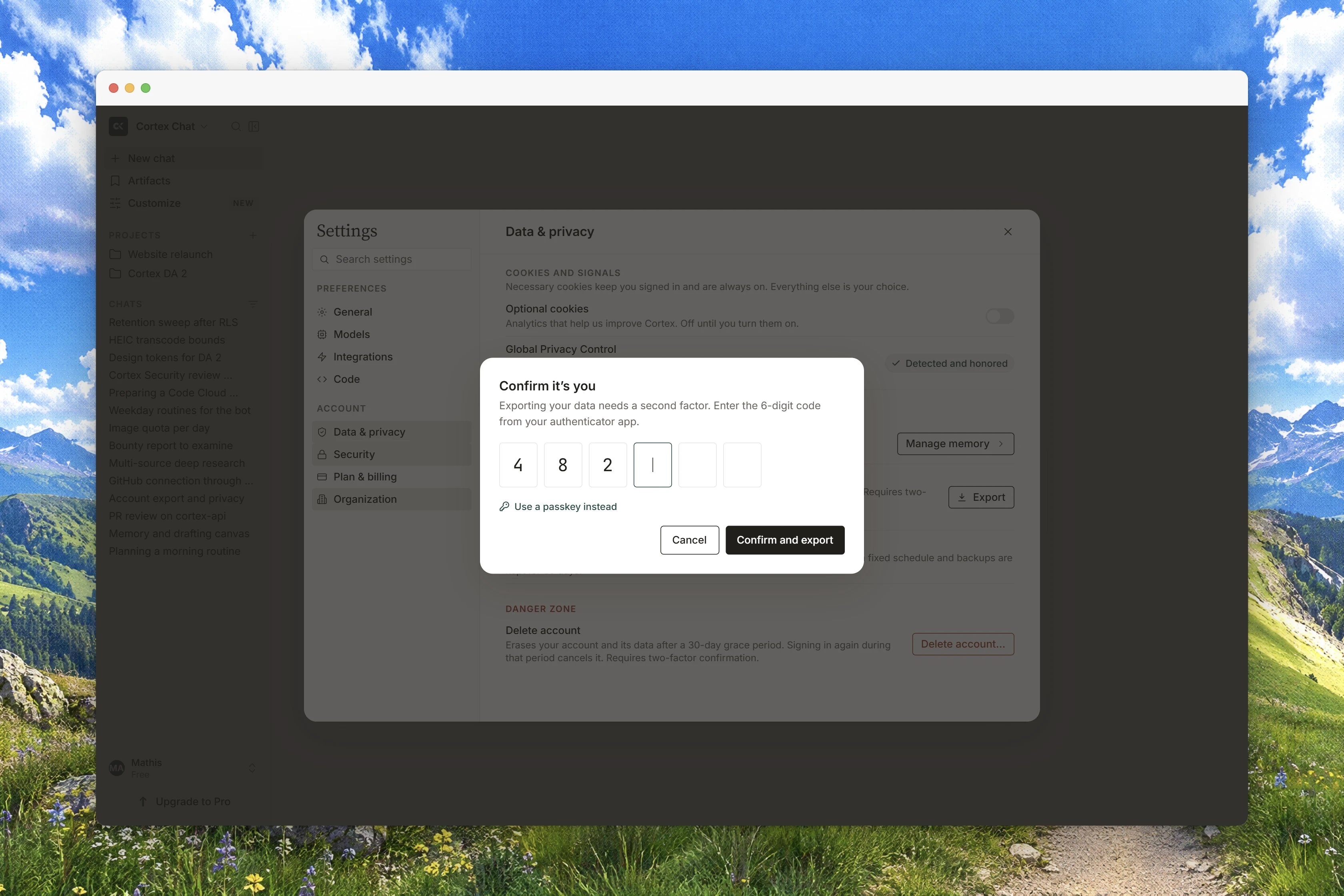
Export is a sensitive action. If you are asked, choose **Confirm to continue** and type the code from your authenticator app. Without an enrolled authenticator and a recent confirmation, the export refuses with `Confirm two-factor authentication, then try again.`
The download starts and the row confirms `Download started — a JSON copy of what we hold for this account.`
The bundle contains what your account can actually see: your account details, conversation **metadata**, your memories, and Library file metadata such as id, filename, kind, size, source and created date. It does **not** contain message bodies and it does not contain file bytes. A member's export also carries Code session metadata, the names of bots they own, Design canvas metadata, project metadata and Cortex Data records, never the token. A guest's export has none of those keys, because a guest cannot own them.
Two values live in your browser rather than on the server, your trusted contact and your date of birth. They are included in the file so the export is complete, and the tab says so: `Trusted contact and date of birth are stored in this browser, not on our servers. They are included here so this export is complete, and they are removed when you erase your account.`
## Delete your account and data
**Delete all data** schedules a real erasure, not a flag on a record.
From **Your data**, choose **Delete all data**. The confirm dialog reads `Delete all your data?` and `This schedules your account, conversations, memories and files for permanent deletion.`
`Erasure runs after a 30-day grace period. Signing in again before it runs cancels the request; after it runs, nothing can be restored.` The dialog cannot be dismissed by clicking outside it.
Enter your authenticator code if you are asked, then choose **Delete all data**. The row becomes `Deletion requested — your data will be permanently erased within 30 days. Signing in again during that time cancels it.`
The request covers your account, conversations, memories, files, bots and canvases. Asking a second time while a request is open changes nothing. To cancel, sign in again before the 30 days are up. Once erasure has run, nothing can be restored and signing in is refused.
## Cookies and Global Privacy Control
On your first visit, the banner **Cookies on this site** offers **Necessary only** and **Allow optional**. The same choice lives under **Cookies** in this tab, as two rows:
| Row | What it covers |
| ---------------------- | ------------------------------------------------------------------------------------------------------------------------------------------------------------------------------------------ |
| **Necessary** | `Session, language, and this preference. Always on — Cortex cannot work without them.` The toggle is on and cannot be changed. |
| **Optional analytics** | `Helps us understand how the product is used. Off until you allow it. Nothing in this build loads an optional tracker; the preference is recorded so a future one cannot fire without it.` |
The default is deny, and the product fails closed while it is still reading your preference. If saving the choice to your account fails, it still holds in this browser and the banner says so: `Your choice is saved in this browser. We could not update the account record — try again from Settings.`
If your browser sends a **Global Privacy Control** signal, Cortex honours it instead of asking again: `Your browser sent a Global Privacy Control signal. Optional cookies stay off. We do not sell personal information.` The optional row is disabled while the signal is present, and a signal always wins over an "allow" sent from the page. To withdraw the opt-out, turn the signal off in your browser, then allow optional analytics explicitly.
## Memory
**Memory** is where Cortex keeps standing preferences and facts you have shared so answers get more personal over time. Three controls sit above the list:
* **Use memory**: `When off, Cortex neither recalls nor writes new memories. Existing ones stay until you delete them.`
* **Include sensitive topics**: `When off, Cortex skips health, finances, and similar topics when saving memories.`
* **How long to keep memories**: `Keep until deleted` or a number of days. `Applies to new and existing memories on this account. Project memories follow the same window.`
Below them, **Account memory** and **Project memory** list what has been saved, tagged **Facts**, **Context**, **Preferences**, **Instructions** or **Other**. You can **Search memories**, **Edit** or **Delete** a single entry, **Erase account memories**, **Erase project memories**, **Export memories**, or **Import memories** (`Paste exported lines. Import only adds; it never overwrites or deletes.`).
Temporary chats never read or write memory. If memory cannot be read at all, it stays off rather than guessing: `Memory could not be loaded, so it stays off. Nothing is listed or saved until the setting can be read.`
## Chat history and improving the model
Two rows near the top of the tab are drawn but disabled, both badged `COMING SOON`:
* **Save chat history**: the toggle is on and cannot be changed. Its copy reads `Conversations are kept in your account so you can pick them up on any device. If you turn this off, new chats disappear when you close them.`
* **Improve the model**: the toggle is off and cannot be changed. Its copy reads `When on, a sample of your conversations may be reviewed to train future models. Off by default — your chats are never used without this setting.`
Neither is a live setting yet, so there is nothing here to turn on or off today. Treat the copy as a description of the control that is coming, not as a preference recorded against your account.
## Activity, computer history and account security
**Activity** (`Review account activity across Chat, Code, and Bot.`) lists the `Last {days} days` with columns **When**, **Actor** and **Action**. Actors are `you`, `admin`, `bot` or `code`; actions include `Signed in`, `API key minted`, `Connector connected`, `Consent updated`, `Export started`, `Deletion queued`, `Bot approval granted` and `PR opened`. When it cannot be read it says so rather than showing an empty table, including `Activity is not available on this deployment yet. The events are recorded, but this list cannot read them back yet.`
**Computer history** belongs to the desktop app: `On the desktop app, record which apps and sites this computer opened — times only, no screenshots or audio. Off by default. Private browsing is never logged.` In a browser the row reads `Recording runs in the Cortex desktop app, not in this browser.`
**Account security** holds **Login alerts** and **Lockdown mode**. Neither is available on this account yet: the alerts toggle is fixed with `Login alerts are not available on this account yet.`, and the lockdown button answers `Lockdown is not available on this account yet.`
**Two-factor authentication** also lives in this tab, because export and deletion depend on it. See [Two-factor authentication](/getting-started/two-factor) for enrolment and recovery.
**API keys** are reserved rather than issued. The section explains itself: `Create, rotate and revoke stay disabled until the account API stores only hashes and can deny expired keys immediately.` There are no programmatic keys today.
## Compliance
**Compliance** is a section inside this tab, not a separate Settings tab. Its lede is `What this deployment certifies — and what it does not.`
**Data region** is pinned to the region this deployment runs in, shown as a `PINNED · {region}` pill with the zones `EU` / `Frankfurt · eu-central-1` and `US` / `Virginia · us-east-1` marked `SELECTED`, `AVAILABLE` or `NOT OFFERED`. You cannot move a region from the app: `Region changes are not available in the app: they require a new deployment and a scheduled migration window.`
**Attestations** are listed as statuses, never as seals: `Listed exactly as they stand. A status is not a certificate.` **SOC 2 Type II** reads `No report on file. We will say so when one exists.`, **GDPR readiness** reads `Readiness work is tracked; no certification is claimed.`, and **HIPAA** reads `Not certified. PHI needs a signed BAA first.` The section closes with the rule the product holds itself to: `Product copy never claims certification until an attestation exists.`
A **BAA · PHI-safe defaults** card explains that covered entities need a signed BAA before any PHI is processed, and that the defaults it lists are already on, so nothing about them changes when one is signed. **Request a BAA** opens an email; sending it signs nothing. The HIPAA certification claim row reads `NEVER · UNTIL ATTESTED`.
Cortex is not certified under SOC 2, GDPR or HIPAA, and this tab never says it is. Read the statuses literally.
## What Cortex stores, and for how long
The tab closes with a card headed `WHAT WE STORE`: `Your account details, conversations and attachments while history is on, saved memories, and billing records. We never store the content of connected apps — Cortex reads them at question time, then discards the data.`
Conversations, Chat library files and Design canvases you still hold are not deleted on a schedule; they stay until you delete them or delete the account. Backups are kept 35 days. Operational records are pruned on their own schedule:
| Record | Kept for |
| -------------------- | -------------------------------------------------- |
| Audit log | 90 days queryable, then archived |
| Routing decisions | 30 days |
| Usage events | 1 year |
| Sandbox executions | 30 days |
| Delivered events | 7 days |
| Idempotency records | 24 hours |
| Revoked sessions | 30 days |
| Safety events | 2 years |
| Data-request records | 3 years |
| Erasure log | Kept indefinitely, identifiers only, never content |
## Related
* [Two-factor authentication](/getting-started/two-factor)
* [Settings](/getting-started/settings)
* [Memory](/chat/memory)
* [Security and privacy](/reference/security-and-privacy)
* [Accounts and sign-in](/getting-started/accounts)
## Export your data
**Export my data** builds a JSON file, `cortex-data-export.json`, while you wait. There is no queue and no status page.
Choose **Settings** in the sidebar footer, then **Data & privacy**. Scroll to **Your data** (`Export everything we hold, or delete it permanently. Deletion takes effect within 30 days.`).
Choose **Export my data**. The button becomes `Preparing export…`.
Export is a sensitive action. If you are asked, choose **Confirm to continue** and type the code from your authenticator app. Without an enrolled authenticator and a recent confirmation, the export refuses with `Confirm two-factor authentication, then try again.`
The download starts and the row confirms `Download started — a JSON copy of what we hold for this account.`
The bundle contains what your account can actually see: your account details, conversation **metadata**, your memories, and Library file metadata such as id, filename, kind, size, source and created date. It does **not** contain message bodies and it does not contain file bytes. A member's export also carries Code session metadata, the names of bots they own, Design canvas metadata, project metadata and Cortex Data records, never the token. A guest's export has none of those keys, because a guest cannot own them.
Two values live in your browser rather than on the server, your trusted contact and your date of birth. They are included in the file so the export is complete, and the tab says so: `Trusted contact and date of birth are stored in this browser, not on our servers. They are included here so this export is complete, and they are removed when you erase your account.`
## Delete your account and data
**Delete all data** schedules a real erasure, not a flag on a record.
From **Your data**, choose **Delete all data**. The confirm dialog reads `Delete all your data?` and `This schedules your account, conversations, memories and files for permanent deletion.`
`Erasure runs after a 30-day grace period. Signing in again before it runs cancels the request; after it runs, nothing can be restored.` The dialog cannot be dismissed by clicking outside it.
Enter your authenticator code if you are asked, then choose **Delete all data**. The row becomes `Deletion requested — your data will be permanently erased within 30 days. Signing in again during that time cancels it.`
The request covers your account, conversations, memories, files, bots and canvases. Asking a second time while a request is open changes nothing. To cancel, sign in again before the 30 days are up. Once erasure has run, nothing can be restored and signing in is refused.
## Cookies and Global Privacy Control
On your first visit, the banner **Cookies on this site** offers **Necessary only** and **Allow optional**. The same choice lives under **Cookies** in this tab, as two rows:
| Row | What it covers |
| ---------------------- | ------------------------------------------------------------------------------------------------------------------------------------------------------------------------------------------ |
| **Necessary** | `Session, language, and this preference. Always on — Cortex cannot work without them.` The toggle is on and cannot be changed. |
| **Optional analytics** | `Helps us understand how the product is used. Off until you allow it. Nothing in this build loads an optional tracker; the preference is recorded so a future one cannot fire without it.` |
The default is deny, and the product fails closed while it is still reading your preference. If saving the choice to your account fails, it still holds in this browser and the banner says so: `Your choice is saved in this browser. We could not update the account record — try again from Settings.`
If your browser sends a **Global Privacy Control** signal, Cortex honours it instead of asking again: `Your browser sent a Global Privacy Control signal. Optional cookies stay off. We do not sell personal information.` The optional row is disabled while the signal is present, and a signal always wins over an "allow" sent from the page. To withdraw the opt-out, turn the signal off in your browser, then allow optional analytics explicitly.
## Memory
**Memory** is where Cortex keeps standing preferences and facts you have shared so answers get more personal over time. Three controls sit above the list:
* **Use memory**: `When off, Cortex neither recalls nor writes new memories. Existing ones stay until you delete them.`
* **Include sensitive topics**: `When off, Cortex skips health, finances, and similar topics when saving memories.`
* **How long to keep memories**: `Keep until deleted` or a number of days. `Applies to new and existing memories on this account. Project memories follow the same window.`
Below them, **Account memory** and **Project memory** list what has been saved, tagged **Facts**, **Context**, **Preferences**, **Instructions** or **Other**. You can **Search memories**, **Edit** or **Delete** a single entry, **Erase account memories**, **Erase project memories**, **Export memories**, or **Import memories** (`Paste exported lines. Import only adds; it never overwrites or deletes.`).
Temporary chats never read or write memory. If memory cannot be read at all, it stays off rather than guessing: `Memory could not be loaded, so it stays off. Nothing is listed or saved until the setting can be read.`
## Chat history and improving the model
Two rows near the top of the tab are drawn but disabled, both badged `COMING SOON`:
* **Save chat history**: the toggle is on and cannot be changed. Its copy reads `Conversations are kept in your account so you can pick them up on any device. If you turn this off, new chats disappear when you close them.`
* **Improve the model**: the toggle is off and cannot be changed. Its copy reads `When on, a sample of your conversations may be reviewed to train future models. Off by default — your chats are never used without this setting.`
Neither is a live setting yet, so there is nothing here to turn on or off today. Treat the copy as a description of the control that is coming, not as a preference recorded against your account.
## Activity, computer history and account security
**Activity** (`Review account activity across Chat, Code, and Bot.`) lists the `Last {days} days` with columns **When**, **Actor** and **Action**. Actors are `you`, `admin`, `bot` or `code`; actions include `Signed in`, `API key minted`, `Connector connected`, `Consent updated`, `Export started`, `Deletion queued`, `Bot approval granted` and `PR opened`. When it cannot be read it says so rather than showing an empty table, including `Activity is not available on this deployment yet. The events are recorded, but this list cannot read them back yet.`
**Computer history** belongs to the desktop app: `On the desktop app, record which apps and sites this computer opened — times only, no screenshots or audio. Off by default. Private browsing is never logged.` In a browser the row reads `Recording runs in the Cortex desktop app, not in this browser.`
**Account security** holds **Login alerts** and **Lockdown mode**. Neither is available on this account yet: the alerts toggle is fixed with `Login alerts are not available on this account yet.`, and the lockdown button answers `Lockdown is not available on this account yet.`
**Two-factor authentication** also lives in this tab, because export and deletion depend on it. See [Two-factor authentication](/getting-started/two-factor) for enrolment and recovery.
**API keys** are reserved rather than issued. The section explains itself: `Create, rotate and revoke stay disabled until the account API stores only hashes and can deny expired keys immediately.` There are no programmatic keys today.
## Compliance
**Compliance** is a section inside this tab, not a separate Settings tab. Its lede is `What this deployment certifies — and what it does not.`
**Data region** is pinned to the region this deployment runs in, shown as a `PINNED · {region}` pill with the zones `EU` / `Frankfurt · eu-central-1` and `US` / `Virginia · us-east-1` marked `SELECTED`, `AVAILABLE` or `NOT OFFERED`. You cannot move a region from the app: `Region changes are not available in the app: they require a new deployment and a scheduled migration window.`
**Attestations** are listed as statuses, never as seals: `Listed exactly as they stand. A status is not a certificate.` **SOC 2 Type II** reads `No report on file. We will say so when one exists.`, **GDPR readiness** reads `Readiness work is tracked; no certification is claimed.`, and **HIPAA** reads `Not certified. PHI needs a signed BAA first.` The section closes with the rule the product holds itself to: `Product copy never claims certification until an attestation exists.`
A **BAA · PHI-safe defaults** card explains that covered entities need a signed BAA before any PHI is processed, and that the defaults it lists are already on, so nothing about them changes when one is signed. **Request a BAA** opens an email; sending it signs nothing. The HIPAA certification claim row reads `NEVER · UNTIL ATTESTED`.
Cortex is not certified under SOC 2, GDPR or HIPAA, and this tab never says it is. Read the statuses literally.
## What Cortex stores, and for how long
The tab closes with a card headed `WHAT WE STORE`: `Your account details, conversations and attachments while history is on, saved memories, and billing records. We never store the content of connected apps — Cortex reads them at question time, then discards the data.`
Conversations, Chat library files and Design canvases you still hold are not deleted on a schedule; they stay until you delete them or delete the account. Backups are kept 35 days. Operational records are pruned on their own schedule:
| Record | Kept for |
| -------------------- | -------------------------------------------------- |
| Audit log | 90 days queryable, then archived |
| Routing decisions | 30 days |
| Usage events | 1 year |
| Sandbox executions | 30 days |
| Delivered events | 7 days |
| Idempotency records | 24 hours |
| Revoked sessions | 30 days |
| Safety events | 2 years |
| Data-request records | 3 years |
| Erasure log | Kept indefinitely, identifiers only, never content |
## Related
* [Two-factor authentication](/getting-started/two-factor)
* [Settings](/getting-started/settings)
* [Memory](/chat/memory)
* [Security and privacy](/reference/security-and-privacy)
* [Accounts and sign-in](/getting-started/accounts)