> ## Documentation Index
> Fetch the complete documentation index at: https://docs.cortex.foundation/llms.txt
> Use this file to discover all available pages before exploring further.
# Settings
> Settings opens as an overlay over Chat, Code or Bot. Seven tabs in two groups, plus a search that looks across all of them.
Settings in Cortex is an overlay dialog, not a page. It opens over whatever you were doing in Cortex Chat, Cortex Code or Cortex Bot, and closing it puts you back exactly where you were. Guests can browse it: the account controls say they need an account rather than disappearing.
This page names every tab and the controls inside it, so you can find a setting you cannot place. Depth on a specific area lives on that area's page, and this page links out where that is true.
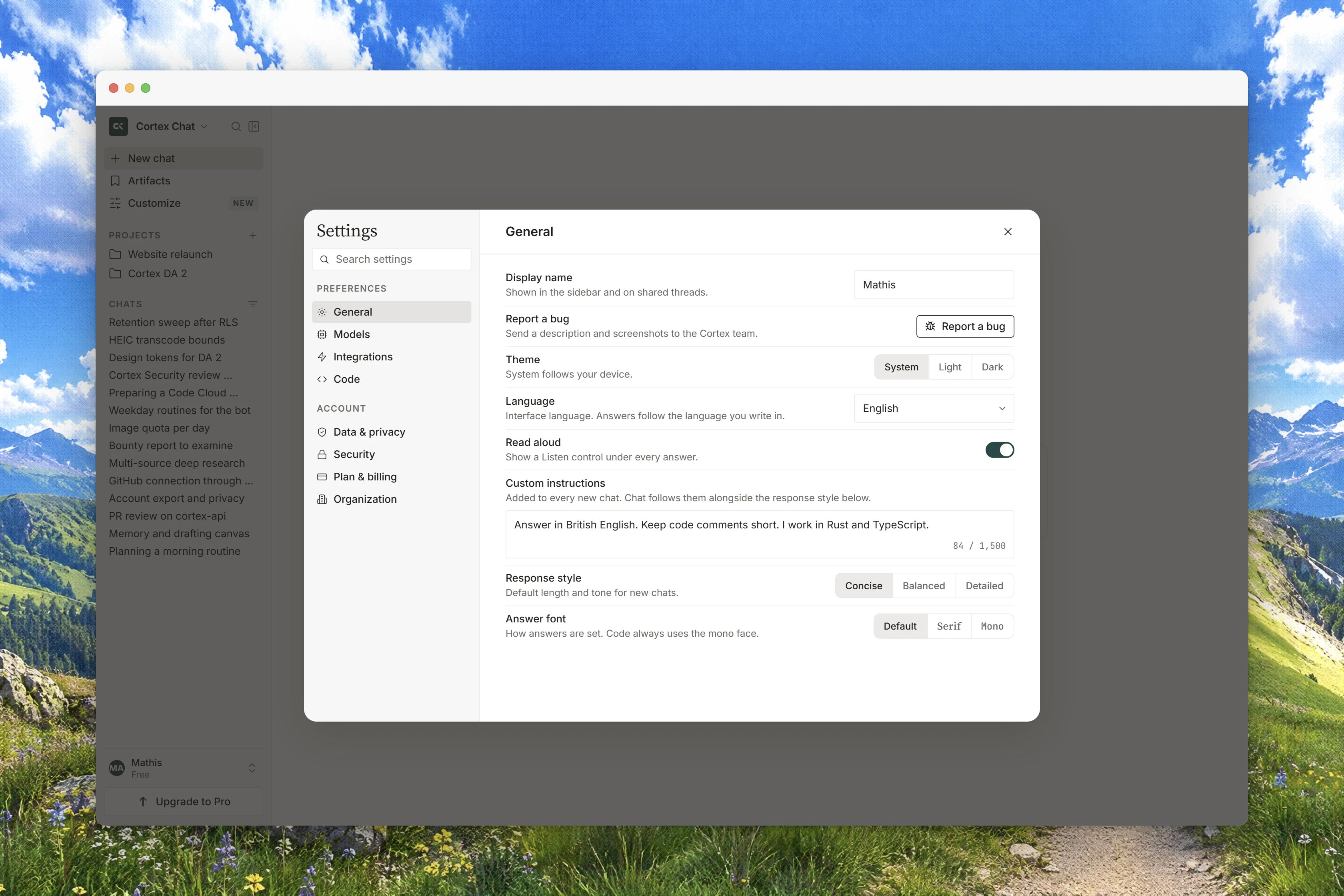 ## Open Settings
Choose **Settings** in the sidebar footer. Two deep links open the overlay directly: `cortex.foundation/settings` opens it over Chat, and `cortex.foundation/code/settings` opens it over Code. Adding `?tab=` and a tab slug opens a named tab, and an unknown value falls back to **General**. The slugs are `general`, `models`, `integrations`, `code`, `approvals`, `data-privacy` and `plan-billing`.
Two behaviours are worth knowing. Moving to another page in the product closes Settings, so it never traps you. And dismissing the overlay rewrites the address back to the product, so the Back button never returns you to a blank Settings URL.
## The seven tabs
The left rail has two groups: `PREFERENCES` and `ACCOUNT`.
| Group | Tab | What is inside |
| ------------- | ------------------ | -------------------------------------------------------------------------------------------------------------------------------- |
| `PREFERENCES` | **General** | Your email and display name, theme, interface language, keyboard shortcuts, custom instructions, desktop extras, reporting a bug |
| `PREFERENCES` | **Models** | Default model, default thinking level, reasoning summaries, voice and token allowances |
| `PREFERENCES` | **Integrations** | Connected apps, MCP servers, roles, directory provisioning |
| `PREFERENCES` | **Code** | Cortex Code's default model, fallbacks, allowlist, providers, pull-request review, hooks |
| `PREFERENCES` | **Approvals** | The approval matrix across Chat, Code and Bot, spend budget and receipts |
| `ACCOUNT` | **Data & privacy** | History, memory, cookies, activity, two-factor, compliance, export and deletion |
| `ACCOUNT` | **Plan & billing** | Your plan, quota meters, storage, usage ledger, plan changes |
There is no Plugins tab and no Compliance tab. Plugins live in the sidebar under `WORKSPACE`, and compliance is a section inside **Data & privacy**. If you have read otherwise, that list was stale.
## Search inside Settings
The field at the top of the left rail is **Search settings**, and it searches rows across every tab rather than only the open one. Picking a result jumps to that row on its tab. The count reads as `{count} results`, `Clear search` returns to browsing, and no match shows `No settings match "{query}"` with `Try a shorter word, or clear the search to browse all tabs.`
Most rows save themselves: the control shows `Saving…` and then `Saved`. Two badges tell you when a row is not usable. `COMING SOON` means the control is designed and drawn but not built yet. `HOLD` means the action cannot be completed on this deployment right now.
## General
| Row | What it does |
| ----------------------- | ----------------------------------------------------------------------------------------------------------------------------------------------------------------------------------------------------------------------------------------- |
| **Email** | `The address you sign in with.` Read-only, and members only. |
| **Display name** | `How Cortex refers to you.` Up to 120 characters. |
| **Report a bug** | `Send a title, a description and optional screenshots. This stays in Cortex.` Signed-in accounts only. |
| **Theme** | `Light`, `Dark` or `System`. `System` follows the operating system as it changes. |
| **Language** | `Interface language. Model prompts stay in English.` Eight entries. |
| **Answer font** | `Sans` or `Serif`. Disabled, marked `COMING SOON`. |
| **Desktop companion** | A preview of the desktop app's floating companion, global **Quick Chat** and activity tray. |
| **Keyboard shortcuts** | A two-row list plus a button that opens the full sheet. |
| **Scheduled tasks** | `Review and manage Chat schedules.` An `Open` link to the Scheduled page. |
| **Custom instructions** | `How Cortex should reply` and `What Cortex should know about you`, with the tone chips `Concise`, `Direct` and `Teacher`. Guests cannot set them, and some deployments answer `Custom instructions are not available on this deployment.` |
| **Appshots** | The desktop-only capture chord: `⌘ ⌘` on a Mac, `Alt Alt` on Windows. `This chord lives on the desktop app. The web has no global hotkey.` |
A guest sees `You're browsing as a guest.` and `Sign in to manage your account` in place of the email and display-name rows.
## Models
| Row | What it does |
| ---------------------------- | ------------------------------------------------------------------------------------- |
| **Default model** | `Used for new chats. You can switch models anytime from the composer.` |
| **Default thinking level** | `Low`, `Medium` or `High`. `How much time Cortex spends reasoning before it answers.` |
| **Show reasoning summaries** | `Display a short summary of the model's thinking above each answer.` |
| **Voice minutes** | `Spoken live-voice time on this plan, separate from model tokens.` |
| **Model tokens** | `Text and reasoning tokens. Not combined with voice minutes.` |
| **Background conversations** | `Keep a live voice session going when you leave the tab. Off by default.` |
| **Live on lock screen** | `Show the last spoken line on a lock card. Requires Background conversations.` |
The tab carries its own notice: `Model availability depends on your plan. During peak hours new chats may fall back to a faster model.` Where a plan or a deployment does not offer something, the row says so, for example `Voice minutes are not available on this plan.` or `No voice-capable models on this plan.` See [Models](/chat/models) and [Voice](/chat/voice).
## Integrations
**Apps** connects an app so you can act on it from chat: `A connected integration adds its tools to your conversations.` Rows show `Connected`, `Coming soon`, `Add`, `Disconnect` and a tool count. **MCP servers** attaches a Model Context Protocol server over HTTP by name and URL, with an optional bearer token; a server that advertised nothing shows `No tools were advertised when this server was attached.` A **Cortex Bot** row controls whether your mascots may use those tools, off by default, and `each call still asks first`. See [Tools and connectors](/chat/tools) and [MCP servers](/chat/mcp-servers).
The rest of the tab describes an organisation rather than something you can create. **Roles** reports `Manage connectors`, `Manage roles` and `Manage billing` as `Granted` or `Not granted`, and a deployment that reports no role says `This deployment does not report roles, so nothing here is inferred.` **Organization** lists servers an organisation provisioned, and most deployments answer `No organization servers on this deployment.` **Directory Sync** is plan-gated and usually reports `Directory Sync is not available on this account yet.`, with the stance `Your identity provider stays the source of truth for who exists and who may sign in. Cortex never acts as your identity vendor.`
There are no teams and no invitations in Cortex today, so treat these rows as reserved rather than as a workspace you can staff.
## Code
This tab configures Cortex Code. Most people leave it alone.
| Row | What it does |
| ------------------------------ | ------------------------------------------------------------------------------------------------------------------------------------------------------------------------------ |
| **Default model** | `A provider/model reference from the catalogue. Fallbacks take over in order when the main provider fails.` |
| **Fallbacks** | `Tried in order after the default model.` |
| **Allowlist** | `Empty: any model from an enabled provider is allowed. Otherwise only these provider/model references are.` |
| **Providers** | The hosted catalogue, refreshed for you. Provider keys are never shown in the app. Chips read `Connected`, `Key required` or `Disabled`. |
| `Pull request review` | **Auto-review when a pull request opens** and **Mention @cortex on a pull request**. Both are off, and each says that Code reviews of that kind are not available yet. |
| **Lifecycle hooks** | `Match a tool and a pattern. Timeout or an unreachable store is deny.` Often `Hooks are not configured on this deployment.` |
| **Windows daemon** | A shared Code daemon on a Windows machine, where the deployment offers one. |
| **Show diffs on bash results** | Draws a unified diff in the worklog as hunks. |
| **Platform** | Managed agent sessions, prompt-cache diagnostics and gateway pricing. Usually held: `These controls remain unavailable until the deployment publishes their API capabilities.` |
See [Code settings](/code/settings) for the depth, and [Cortex Security](/code/security) for the review policy, which lives inside Code rather than here.
## Approvals
**Approval matrix** is the centre of this tab: `Choose Ask or Always ask for each verb on Chat, Code, and Bot.` Columns are `Chat`, `Code` and `Bot`; rows are `Read`, `Edit`, `Shell` and `Pay`. `Pay stays Always ask.` and `Bot cannot publish. That cell is absent, not disabled.` Autonomy can be earned after a threshold of approvals, with a decay measured in days.
The tab also holds **Export policy** (`Download the current matrix as JSON.`), **Standing spend budget** (`A monthly cap for metered spend. Empty means no standing budget.`) and **Spend receipts**, which starts at `No spend receipts yet.` When Cortex asks in the moment, your choices are `Allow once`, `Allow up to a budget` or `Deny`. See [Approvals in Code](/code/approvals) and [Approvals in Bot](/bot/approvals).
## Data & privacy
The account tab, in render order: **Save chat history** and **Improve the model** (both disabled and marked `COMING SOON`), **Activity**, **Computer history**, **Cookies**, the memory rows (**Use memory**, **Include sensitive topics**, **How long to keep memories**, **Memory**), **Account security**, **Two-factor authentication**, **Trusted contact**, **Crisis notify**, **Age assurance (13+)**, **API keys**, **Compliance** (`What this deployment certifies — and what it does not.`) and **Your data** (`Export everything we hold, or delete it permanently. Deletion takes effect within 30 days.`).
It closes with a `WHAT WE STORE` card. See [Data and privacy](/getting-started/data-and-privacy) for the full walkthrough and [Two-factor authentication](/getting-started/two-factor) for the confirmation that guards export and deletion.
## Plan & billing
Your current plan and price, the quota meters, a `STORAGE` meter for Library, the usage ledger split by product, `Change plan`, and `Billing history`. See [Plans and quotas](/getting-started/plans).
## Settings that live elsewhere
| Surface | Where its settings live |
| ---------------------- | ---------------------------------------------------------------------------------------------------------------------------------------------------- |
| Cortex CLI | `/settings` in the terminal interface, `cortex config`, and the CLI config file in your home directory. See [CLI configuration](/cli/configuration). |
| Connected apps | **Customize** in the sidebar, and **Settings → Integrations**. See [Tools and connectors](/chat/tools). |
| Cortex Security policy | The review policy page inside Cortex Code. See [Review policy](/security/review-policy). |
| Cortex Design | Its own settings inside the canvas app. See [Design settings](/design/settings). |
## Related
* [Accounts and sign-in](/getting-started/accounts) - what the account rows in General reflect.
* [Plans and quotas](/getting-started/plans) - the meters on the Plan & billing tab.
* [Data and privacy](/getting-started/data-and-privacy) - every section of the Data & privacy tab.
* [Interface language](/getting-started/language) - the eight languages and what stays English.
* [Keyboard shortcuts](/getting-started/keyboard-shortcuts) - the full sheet behind the General row.
* [Notifications](/getting-started/notifications) - the bell, which sits outside Settings.
## Open Settings
Choose **Settings** in the sidebar footer. Two deep links open the overlay directly: `cortex.foundation/settings` opens it over Chat, and `cortex.foundation/code/settings` opens it over Code. Adding `?tab=` and a tab slug opens a named tab, and an unknown value falls back to **General**. The slugs are `general`, `models`, `integrations`, `code`, `approvals`, `data-privacy` and `plan-billing`.
Two behaviours are worth knowing. Moving to another page in the product closes Settings, so it never traps you. And dismissing the overlay rewrites the address back to the product, so the Back button never returns you to a blank Settings URL.
## The seven tabs
The left rail has two groups: `PREFERENCES` and `ACCOUNT`.
| Group | Tab | What is inside |
| ------------- | ------------------ | -------------------------------------------------------------------------------------------------------------------------------- |
| `PREFERENCES` | **General** | Your email and display name, theme, interface language, keyboard shortcuts, custom instructions, desktop extras, reporting a bug |
| `PREFERENCES` | **Models** | Default model, default thinking level, reasoning summaries, voice and token allowances |
| `PREFERENCES` | **Integrations** | Connected apps, MCP servers, roles, directory provisioning |
| `PREFERENCES` | **Code** | Cortex Code's default model, fallbacks, allowlist, providers, pull-request review, hooks |
| `PREFERENCES` | **Approvals** | The approval matrix across Chat, Code and Bot, spend budget and receipts |
| `ACCOUNT` | **Data & privacy** | History, memory, cookies, activity, two-factor, compliance, export and deletion |
| `ACCOUNT` | **Plan & billing** | Your plan, quota meters, storage, usage ledger, plan changes |
There is no Plugins tab and no Compliance tab. Plugins live in the sidebar under `WORKSPACE`, and compliance is a section inside **Data & privacy**. If you have read otherwise, that list was stale.
## Search inside Settings
The field at the top of the left rail is **Search settings**, and it searches rows across every tab rather than only the open one. Picking a result jumps to that row on its tab. The count reads as `{count} results`, `Clear search` returns to browsing, and no match shows `No settings match "{query}"` with `Try a shorter word, or clear the search to browse all tabs.`
Most rows save themselves: the control shows `Saving…` and then `Saved`. Two badges tell you when a row is not usable. `COMING SOON` means the control is designed and drawn but not built yet. `HOLD` means the action cannot be completed on this deployment right now.
## General
| Row | What it does |
| ----------------------- | ----------------------------------------------------------------------------------------------------------------------------------------------------------------------------------------------------------------------------------------- |
| **Email** | `The address you sign in with.` Read-only, and members only. |
| **Display name** | `How Cortex refers to you.` Up to 120 characters. |
| **Report a bug** | `Send a title, a description and optional screenshots. This stays in Cortex.` Signed-in accounts only. |
| **Theme** | `Light`, `Dark` or `System`. `System` follows the operating system as it changes. |
| **Language** | `Interface language. Model prompts stay in English.` Eight entries. |
| **Answer font** | `Sans` or `Serif`. Disabled, marked `COMING SOON`. |
| **Desktop companion** | A preview of the desktop app's floating companion, global **Quick Chat** and activity tray. |
| **Keyboard shortcuts** | A two-row list plus a button that opens the full sheet. |
| **Scheduled tasks** | `Review and manage Chat schedules.` An `Open` link to the Scheduled page. |
| **Custom instructions** | `How Cortex should reply` and `What Cortex should know about you`, with the tone chips `Concise`, `Direct` and `Teacher`. Guests cannot set them, and some deployments answer `Custom instructions are not available on this deployment.` |
| **Appshots** | The desktop-only capture chord: `⌘ ⌘` on a Mac, `Alt Alt` on Windows. `This chord lives on the desktop app. The web has no global hotkey.` |
A guest sees `You're browsing as a guest.` and `Sign in to manage your account` in place of the email and display-name rows.
## Models
| Row | What it does |
| ---------------------------- | ------------------------------------------------------------------------------------- |
| **Default model** | `Used for new chats. You can switch models anytime from the composer.` |
| **Default thinking level** | `Low`, `Medium` or `High`. `How much time Cortex spends reasoning before it answers.` |
| **Show reasoning summaries** | `Display a short summary of the model's thinking above each answer.` |
| **Voice minutes** | `Spoken live-voice time on this plan, separate from model tokens.` |
| **Model tokens** | `Text and reasoning tokens. Not combined with voice minutes.` |
| **Background conversations** | `Keep a live voice session going when you leave the tab. Off by default.` |
| **Live on lock screen** | `Show the last spoken line on a lock card. Requires Background conversations.` |
The tab carries its own notice: `Model availability depends on your plan. During peak hours new chats may fall back to a faster model.` Where a plan or a deployment does not offer something, the row says so, for example `Voice minutes are not available on this plan.` or `No voice-capable models on this plan.` See [Models](/chat/models) and [Voice](/chat/voice).
## Integrations
**Apps** connects an app so you can act on it from chat: `A connected integration adds its tools to your conversations.` Rows show `Connected`, `Coming soon`, `Add`, `Disconnect` and a tool count. **MCP servers** attaches a Model Context Protocol server over HTTP by name and URL, with an optional bearer token; a server that advertised nothing shows `No tools were advertised when this server was attached.` A **Cortex Bot** row controls whether your mascots may use those tools, off by default, and `each call still asks first`. See [Tools and connectors](/chat/tools) and [MCP servers](/chat/mcp-servers).
The rest of the tab describes an organisation rather than something you can create. **Roles** reports `Manage connectors`, `Manage roles` and `Manage billing` as `Granted` or `Not granted`, and a deployment that reports no role says `This deployment does not report roles, so nothing here is inferred.` **Organization** lists servers an organisation provisioned, and most deployments answer `No organization servers on this deployment.` **Directory Sync** is plan-gated and usually reports `Directory Sync is not available on this account yet.`, with the stance `Your identity provider stays the source of truth for who exists and who may sign in. Cortex never acts as your identity vendor.`
There are no teams and no invitations in Cortex today, so treat these rows as reserved rather than as a workspace you can staff.
## Code
This tab configures Cortex Code. Most people leave it alone.
| Row | What it does |
| ------------------------------ | ------------------------------------------------------------------------------------------------------------------------------------------------------------------------------ |
| **Default model** | `A provider/model reference from the catalogue. Fallbacks take over in order when the main provider fails.` |
| **Fallbacks** | `Tried in order after the default model.` |
| **Allowlist** | `Empty: any model from an enabled provider is allowed. Otherwise only these provider/model references are.` |
| **Providers** | The hosted catalogue, refreshed for you. Provider keys are never shown in the app. Chips read `Connected`, `Key required` or `Disabled`. |
| `Pull request review` | **Auto-review when a pull request opens** and **Mention @cortex on a pull request**. Both are off, and each says that Code reviews of that kind are not available yet. |
| **Lifecycle hooks** | `Match a tool and a pattern. Timeout or an unreachable store is deny.` Often `Hooks are not configured on this deployment.` |
| **Windows daemon** | A shared Code daemon on a Windows machine, where the deployment offers one. |
| **Show diffs on bash results** | Draws a unified diff in the worklog as hunks. |
| **Platform** | Managed agent sessions, prompt-cache diagnostics and gateway pricing. Usually held: `These controls remain unavailable until the deployment publishes their API capabilities.` |
See [Code settings](/code/settings) for the depth, and [Cortex Security](/code/security) for the review policy, which lives inside Code rather than here.
## Approvals
**Approval matrix** is the centre of this tab: `Choose Ask or Always ask for each verb on Chat, Code, and Bot.` Columns are `Chat`, `Code` and `Bot`; rows are `Read`, `Edit`, `Shell` and `Pay`. `Pay stays Always ask.` and `Bot cannot publish. That cell is absent, not disabled.` Autonomy can be earned after a threshold of approvals, with a decay measured in days.
The tab also holds **Export policy** (`Download the current matrix as JSON.`), **Standing spend budget** (`A monthly cap for metered spend. Empty means no standing budget.`) and **Spend receipts**, which starts at `No spend receipts yet.` When Cortex asks in the moment, your choices are `Allow once`, `Allow up to a budget` or `Deny`. See [Approvals in Code](/code/approvals) and [Approvals in Bot](/bot/approvals).
## Data & privacy
The account tab, in render order: **Save chat history** and **Improve the model** (both disabled and marked `COMING SOON`), **Activity**, **Computer history**, **Cookies**, the memory rows (**Use memory**, **Include sensitive topics**, **How long to keep memories**, **Memory**), **Account security**, **Two-factor authentication**, **Trusted contact**, **Crisis notify**, **Age assurance (13+)**, **API keys**, **Compliance** (`What this deployment certifies — and what it does not.`) and **Your data** (`Export everything we hold, or delete it permanently. Deletion takes effect within 30 days.`).
It closes with a `WHAT WE STORE` card. See [Data and privacy](/getting-started/data-and-privacy) for the full walkthrough and [Two-factor authentication](/getting-started/two-factor) for the confirmation that guards export and deletion.
## Plan & billing
Your current plan and price, the quota meters, a `STORAGE` meter for Library, the usage ledger split by product, `Change plan`, and `Billing history`. See [Plans and quotas](/getting-started/plans).
## Settings that live elsewhere
| Surface | Where its settings live |
| ---------------------- | ---------------------------------------------------------------------------------------------------------------------------------------------------- |
| Cortex CLI | `/settings` in the terminal interface, `cortex config`, and the CLI config file in your home directory. See [CLI configuration](/cli/configuration). |
| Connected apps | **Customize** in the sidebar, and **Settings → Integrations**. See [Tools and connectors](/chat/tools). |
| Cortex Security policy | The review policy page inside Cortex Code. See [Review policy](/security/review-policy). |
| Cortex Design | Its own settings inside the canvas app. See [Design settings](/design/settings). |
## Related
* [Accounts and sign-in](/getting-started/accounts) - what the account rows in General reflect.
* [Plans and quotas](/getting-started/plans) - the meters on the Plan & billing tab.
* [Data and privacy](/getting-started/data-and-privacy) - every section of the Data & privacy tab.
* [Interface language](/getting-started/language) - the eight languages and what stays English.
* [Keyboard shortcuts](/getting-started/keyboard-shortcuts) - the full sheet behind the General row.
* [Notifications](/getting-started/notifications) - the bell, which sits outside Settings.