

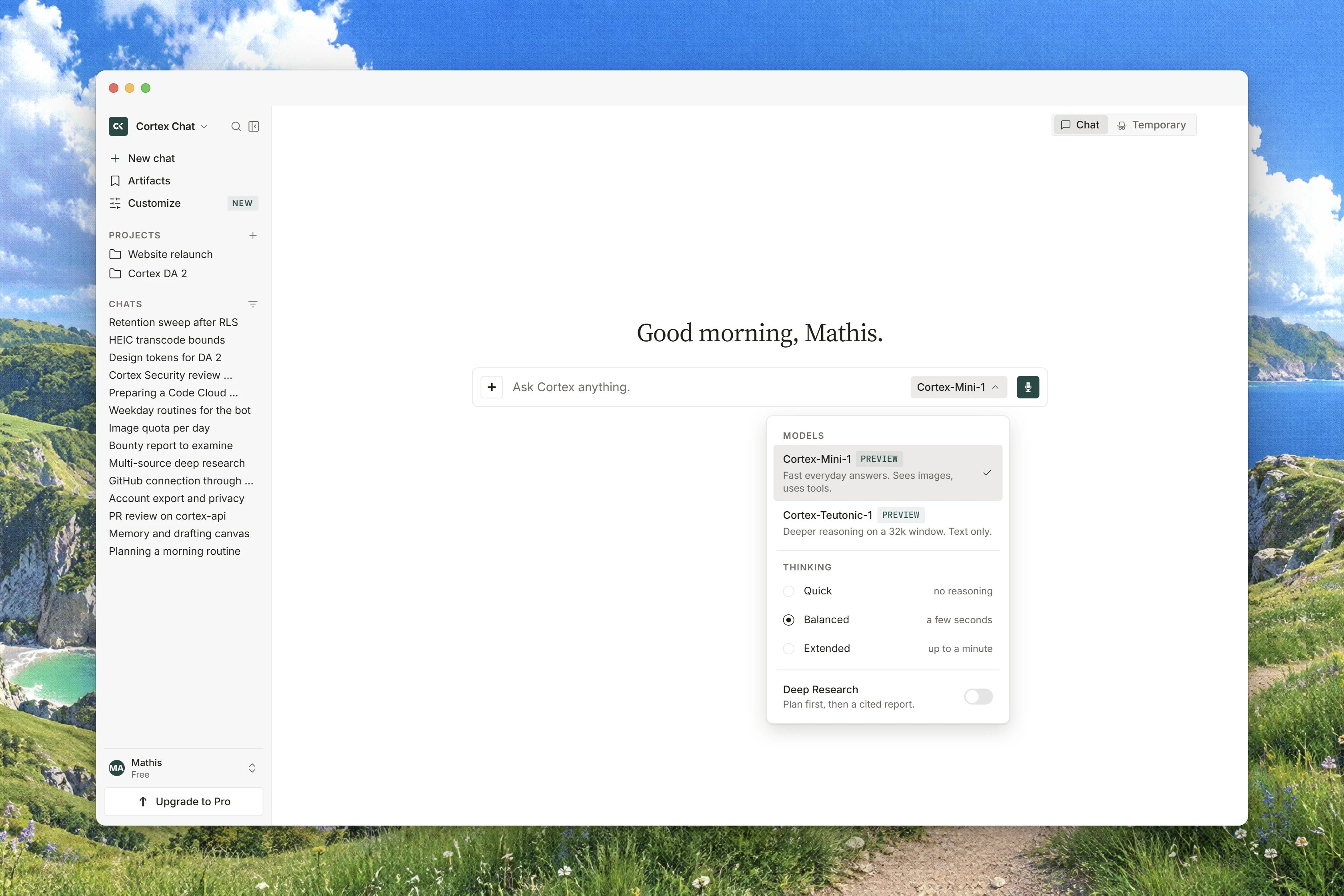
Interface preview
The two models
The list in the panel is fetched from Cortex when the page loads rather than built into the app, so it always reflects what your account can actually use. Today it holds two entries, and both are marked Preview.
Cortex 1 Mini is the model Chat serves by default. Cortex Teutonic-1 is a second preview with a smaller context window.
Each model also caps how long a single answer can be. Cortex 1 Mini writes up to 32,768 tokens in one answer. Cortex Teutonic-1’s ceiling is lower, and because it is still under active training you should not plan a long single-shot generation around it: split the work into turns instead.
Neither of these models advertises image understanding, which matters when you attach a picture. See Attachments and files.
Image generation does not use either of them. Asking Chat for a picture routes to a separate image model that is not offered in this picker, as described in Image generation.
What Preview means
Both rows carry an uppercase PREVIEW badge. It is a maturity signal about the name, not a different service: a preview model is served on the same production path as anything else. Read it as “this model is new and may change”, not as “this model is running somewhere experimental”.Because both published models are previews, every row in the picker shows the badge. Nothing is hidden behind it, and there is nothing to opt into.
The model belongs to the conversation
The model is chosen when a chat starts and stays fixed for the life of that conversation. There is no control that swaps the model of an existing thread. If you want a different one, start a new chat. A model your plan cannot reach is listed in the panel with the reason, rather than being hidden, on the principle that knowing what a plan would add is useful information. In practice no Chat model is plan-gated today: both are available from the Free plan up, so you will not meet a locked row in Chat. Set as default… is in the panel but not wired yet. Choosing it answers Set as default is not available yet — the session default is chosen when the chat starts.Use a different model for one message
The one exception to the fixed model is a single message.1
Open the model chip
Click the chip under the composer.
2
Choose This message only
Pick This message only, then pick the model. The hint states the scope: Applies to your next message. The session default is unchanged.
3
Send
The chip shows the chosen model followed by this message, so you can see that the override is armed. It applies to the next message you send and then falls away.
4
Change your mind
Reset to the session default puts the chip back. The session default itself is shown as the model name followed by session default.
Thinking effort
Thinking is a three-way choice under the THINKING heading in the model panel: Low, Medium or High. The panel states what you are trading: Higher thinking spends more time before answering. Arrow keys move between the three levels and wrap around. Use Low for quick factual questions where a fast answer is the point. Use High for multi-step reasoning, careful writing, and anything where a wrong first draft is expensive. Medium is a reasonable middle for everyday work. Two things are worth knowing about the control itself:- It is attached to the model, not to your plan. Thinking runs are not metered on any plan, so raising the level costs you nothing beyond the wait.
- It is drawn only on a model that supports thinking, and simply absent on one that does not, rather than greyed out. Both models published today support it, so you should always see it in Chat.
What you see while a model thinks
While the turn runs, the reasoning streams into a collapsible Thinking block. Before the first tokens arrive it reads Waiting for the first tokens…. When the answer starts it collapses to a single line, Thought for a duration, or Thought about this when the duration was not recorded. Some turns do no thinking at all. The block then says No reasoning was recorded for this turn., which is a normal outcome and not a failure.When a model is busy or unavailable
Chat never quietly substitutes one model for another. If something is wrong you are told, and you are offered whatever is still available.
When a per-model limit is reached, the banner names the model that is still available and offers a button to use it. That is a choice you make, not a switch made for you.
Related
- Streaming and reconnects - how an answer arrives once a model starts writing.
- How Chat works - what goes into a turn and how the context window is used.
- Attachments and files - what happens to a file you send a model.
- All models - the reference list across the products.
- Plans and quotas - message allowances and what resets when.